
Question:
The angle marking tool is not allowing me to mark the angle I want. How can I fix this?
Answer:
I think your question is relating to this situation – where you are trying to mark angle ABC but the angle marking tool is always finding ABD or DBC.

The standard angle marking tool is extremely quick and useful but it will always have trouble when there are more than one angle defined at a vertex. Instead of trying to “guess” which angle you intended to be marked, it will ALWAYS default to the smallest angle indicated by the position of your mouse.
To mark angle ABC, you need to use a different tool which is not quite as automatic but allows you to clearly indicate which angle you want marked.
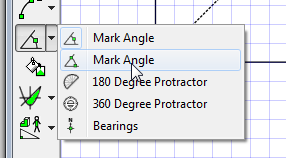
With this angle tool selected, FX Draw will no longer look for angles, instead it will lock on to line segments which could be the “arms” of the angle. Notice how the red circle is locked onto AB
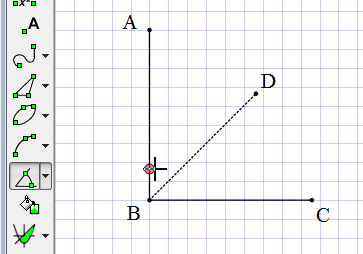
Click and hold the left mouse button, and move to the other arm of the angle you are after – in this case BC.

FX Draw will draw a line indicating the two arms you are trying to mark. Once it has found BC (again, the red circle) release the left mouse button. FX Draw will then construct the angle mark you want.

Discover more from Efofex News
Subscribe to get the latest posts sent to your email.


 Efofex News