FX Manifest Housekeeping

As we rapidly move towards full release of FX Manifest, we have done a bit of housekeeping. FX Manifest represents a dramatic increase in the capabilities of what we are offering and means that it is time to reduce the importance of some of our older systems.

Classic Edition Has Been Deprecated

Deprecated is a powerful word. In the world of software it means…

be usable but regarded as obsolete and best avoided, typically because it has been superseded.

and that describes our Classic Edition perfectly. The underlying technology is Windows only and over thirty years old. We will continue to make it available and support it, but its time has past.

Our new systems, particularly FX Manifest, are our future. They are the only way to use our regeneratable question technology.

FX Graph, FX Stat, FX Chem and FX ChemStruct Becoming Less Important

ALL of the features of FX Graph, FX Stat, FX Chem and FX ChemStruct have long been incorporated into FX Draw and FX Equation and we recommend that you restrict your focus to these two, flagship products. Despite this, we have included them in our downloads and given teachers easy access to them, even though they could not be used to create regeneratable materials.

Now that FX Manifest has made creating regeneratable questions easier, these four products have become even less important, so we are making them SLIGHTLY harder to access (in our Manifest edition downloads). We have done this in two ways.

Firstly, you can no longer insert a new FX Graph, FX Stat, FX Chem or FX ChemStruct object from our new toolbar. That is four buttons that we could remove from the toolbar and makes everything much simpler to explain and use.

Secondly, the products are no longer installed by default in our Manifest edition. If you really want them, you have to manually select them.

Documentation & Website Revamp

We are powering our way through rewriting a lot of our documentation and website – removing lots of references to MultiDocs. The nice thing is that FX Manifest is SO much simpler to use when creating regeneratable questions that most of the changes involve REMOVING complicated instructions.

New Prices for a New Year

Unfortunately, we are not immune to the ravages of inflation and 2026 will bring in slightly higher pricing for some locations. We are trying to keep the rise to a minimum and we will honour any quotes we have made.

Posted in Uncategorized | Leave a comment

FX Manifest – Some Initial Feedback & A Video

The beta release of FX Manifest has been available for just over a month and we have now presented it to a couple of groups of teachers. The feedback has been fantastic!

One of the sessions was at the Mathematical Association of WA annual conference to a group of thirty-two teachers. We presented for about forty minutes and then asked for questions. What we got was… complete silence and an awkward moment. It was quite demoralising!

Eventually, one teacher said…

“To be honest, I feel a bit stunned by what this is capable of. I’m still processing it.”

…and that opened the floodgate of questions and excitement. It turned into one of the better sessions we have ever run. Lots of comments. Lots of ideas. Lots of excitement.

Minor Changes

The beta process has thrown up a few small things that have needed to be fixed as well as some exciting ideas that we are working to add in. Even though we are very happy with FX Manifest’s stability, we are going to leave it officially in “beta” for another month or so.

New Training Video

We have just uploaded a new, “Introduction to FX Manifest” training video. This video both gives you an overview of the problems FX Manifest is designed to solve as well as providing you with some details on how to get up and running. We strongly recommend that you take a look at it. We are now even more confident that FX Manifest has the potential to massively improve the productivity of the teachers in your department and, if you are a subscriber to FX Math Tools, you are already licensed to use it. There is literally no downside to giving it a go!

Introduction To FX Manifest
Posted in FX Manifest | 1 Comment

FX Manifest Beta is Available!

We have just uploaded a version of FX MathTools that includes the beta version of FX Manifest. To begin with, the beta is ONLY included in the Windows version of FX MathTools. It will appear in FX ScienceTools in the next few days and in the Mac version once we have completed testing.

FX Manifest is new – which means that there are new ideas to come to grips with. BY FAR the best way of getting started is to read the First Time User primer available on the startup screen.

The beta version is feature complete and the file format is fixed. This means that you can use it without worrying about losing any work.

We hope that you will be as excited by this as we are!

Posted in Uncategorized | 1 Comment

Announcing FX Manifest!

It’s been over a year since our last post (well, we DID promise that we would not inundate your inbox!) but that doesn’t mean that we haven’t been busy. In fact, we have been working particularly hard to create a brand new product – FX Manifest.

Take A Look

We have put together an announcement video to give you a quick overview of what FX Manifest can do. You can find it at https://youtu.be/p5gzTPwWll8

All of our products are laser focused on saving you time and FX Manifest is no different. This time, we have focused on providing you with a MUCH better way of using our technologies to produce and manage assessments. For the first time, we have looked at the problems that occur at a departmental level.

FX Manifest takes the entire process of creating and managing assessments and provides tools to ease the administrative burdens this can place on heads of department and experienced teachers. If you use FX Manifest to help you create your assessments you can be far more certain that:

  • Marks will add up
  • Curriculum coverage is documented
  • Solutions will be kept up to date
  • Inexperienced teachers will still be able to produce high quality output
  • Your Word documents will be well formatted and placed into the department’s “templates”.
  • The whole experience will be faster and less error-prone.

MultiDocs Evolved

FX Manifest takes our MultiDocs technologies (which allow you to create questions that can regenerate themselves with new numbers) and makes the whole process simpler. If you have previously looked at our MultiDocs offerings, you will find that the rough edges have been knocked off.

And best of all, FX Manifest will be included into the FX MathTools and FX Science Tools subscriptions at no extra charge. There are no downsides to giving this a go.

FX Manifest has been designed to slot into your existing workflows with minimal impact. All of your old, Word-based materials can be moved into FX Manifest by simply copying and pasting – nothing is left behind. Once you have finished working on your assessment, the final output is a standard Word document, full of editable graphics and equations. The only thing you will notice is that the output is better formatted and you got to the end-line quicker and with less stress.

Coming Soon!

We are incredibly excited about this new product and are planning to get a beta version into our downloads this month – so stay tuned!

Posted in Uncategorized | Leave a comment

Stars!

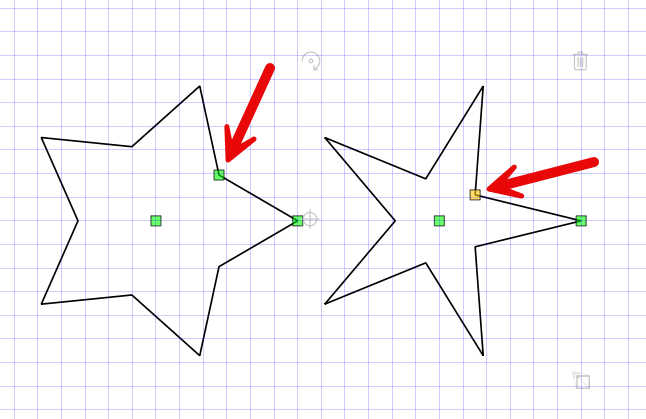
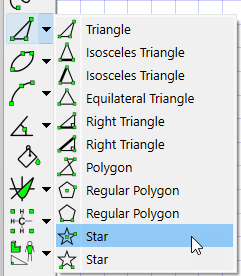
The latest version includes two new star tools which allow you to create any star based on a regular polygon.

Once you have drawn a star, select it. You will see an extra control point which allows you to control the ratio between the star’s inside and outside size. This is the same sized star with two different ratios.

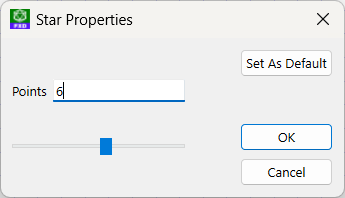
When you right click on a star, you can control the number of points.

By controlling the number of sides and the ratio, you can produce a wide variety of different stars.

Posted in Uncategorized | Leave a comment

Pizza Shapes!

Or circles divided into sectors – your choice.

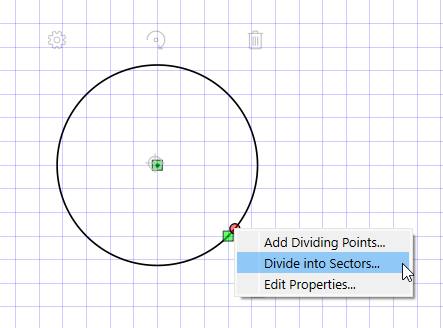
If you right click on a circle, you can now subdivide the circle into sectors.

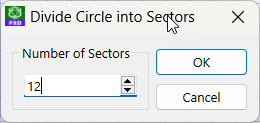
Simply enter the number of sectors you want and push OK.

Posted in Uncategorized | Leave a comment

New Double-Click to Edit in MultiDocs (Windows only)

Probably the biggest difference between our old Classic integration and the new MultiDocs integration is how you edit an existing object. Classic mode was double-clicking, MultiDocs was selecting and pressing the Edit button. It was certainly one of the main stumbling blocks for long-term users.

Now we have managed to implement double-click to edit on the MultiDocs toolbar! Unfortunately, we have not been able to get it to work reliably on Mac machines (there are lots of subtle differences between the Windows version of Word and the Mac version – this just seems to be one of them).

Double-clicking to edit means that the new MultiDocs toolbar is faster to use, offers more features and is (mostly) platform independent. There is even less reason to stick with your old Classic toolbar.

Posted in Uncategorized | 1 Comment

Framework Upgrade

In the latest versions we upgraded the main framework we use to the latest available version to support our new equation to speech functionality. This will have have no impact for most users.

The only affected users are anyone using MacOS Mojave (2018) or Catalina (2019). The new version of the framework is incompatible with these older versions of MacOS.

If you are affected, please consider updating your copy of MacOS to a later version. Alternatively, we have made a version that runs on Mojave and Catalina available on the Obsolete Versions section of our downloads page (http://www.efofex.com/Downloads.php)

Posted in Uncategorized | Leave a comment

New Equations To Speech Feature in FX Equation

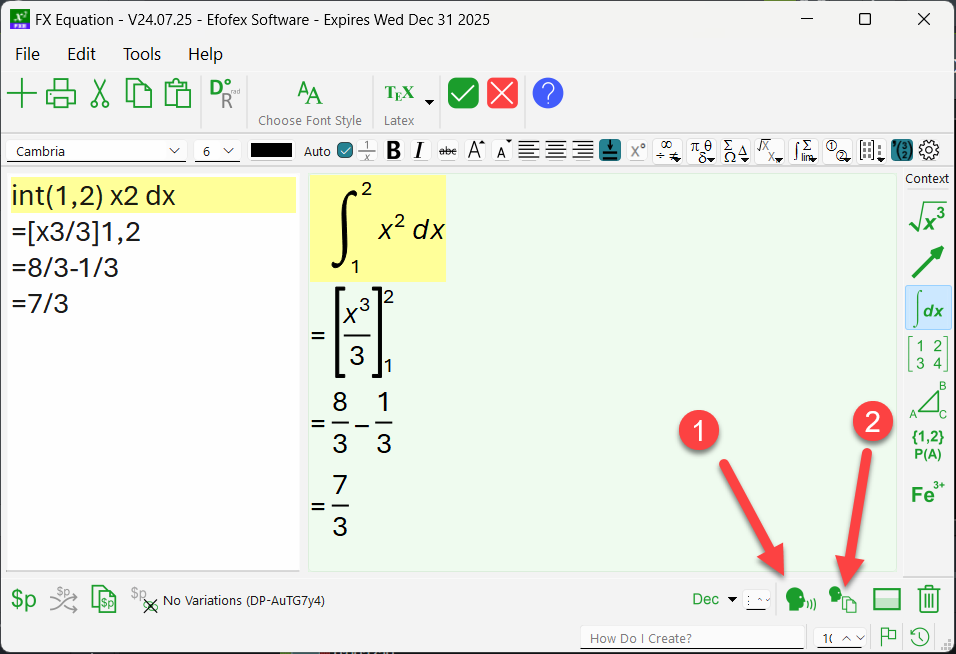
We have introduced a new feature to FX Equation which will read your equation to you.

The first button will read the equation to you, using your operating system’s default text to speech engine and voice. On our machines, it sounds like this…

The second button will provide you with the same information in text form.

The definite integral from 1 to 2 of x squared dx
Equals x cubed over 3 from 1 to 2
Equals 8 thirds subtract 1 third
Equals 7 thirds

Why?

You might be asking yourself why this is important. We started work on the feature to increase your ability to create accessible content. In the near future, our MultiDocs system will add the text description to each equation you create which automatically provides students with sight issues with an accessible version of the equation that their screen reader can read. But it is more useful than that.

In order to be able to “read” mathematics, students need to “hear” mathematics – not just look at it. This new feature allows your students to hear how mathematics is “spoken” – which can only be helpful.

How Good Is It?

Generally, pretty good. The system will read mathematics in much the same way a mathematics teacher would. The further you get away from standard mathematics, the more likely you will find something that it cannot handle. When you do, send us an example and we will try to improve the system.

The other issue with spoken mathematics is that it is entirely dependent on your computer’s text to speech engine and voice. Sometimes this does an excellent job of reading what we have provided but we have noted that some of the voices can get things wrong. For example, on our machines the following equation is read properly by most of the voices we have access to – except one.

P(A) = 0.43

Most voices read this as “The probability of ‘ay'” whereas one of the voices reads it as “The probability of ‘uh'”. These sorts of differences are outside of our control.

Posted in Uncategorized | Leave a comment

More LaTex Support

FX Equation is progressively adding the ability to handle LaTex commands.

Pasting LaTex Into FX Equation

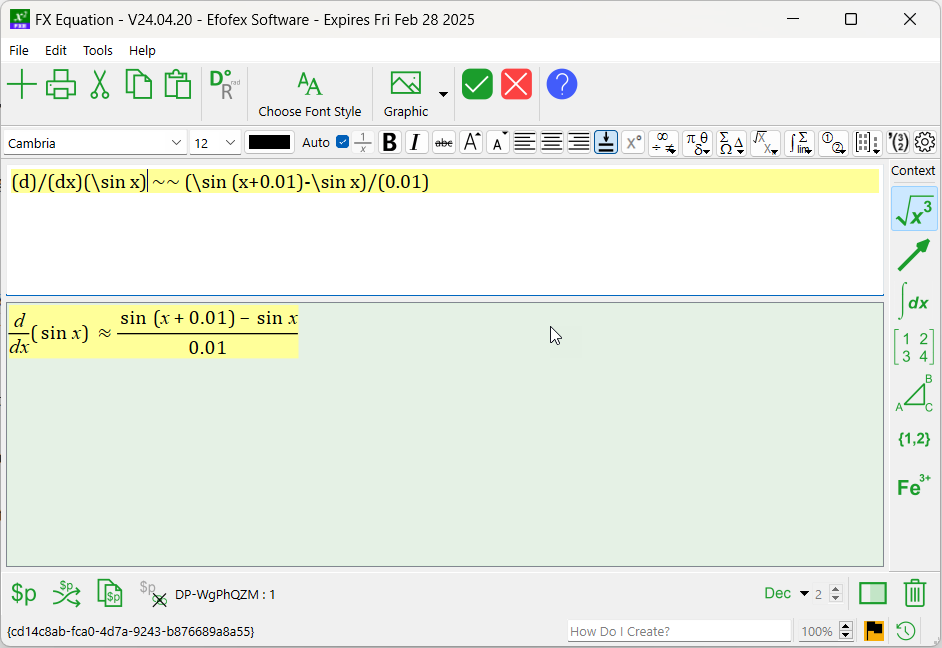
If you copy LaTex commands onto your clipboard they will be automatically transformed if you then paste them into FX Equation. This allows you to quickly transform LaTex equations into FX Equation equations.

To use this feature, select and copy the LaTex commands.

\dfrac{d}{dx}(\sin x)\approx \dfrac{\sin (x+0.01)-\sin x}{0.01}

and paste this directly into FX Equation

LaTex Command Support

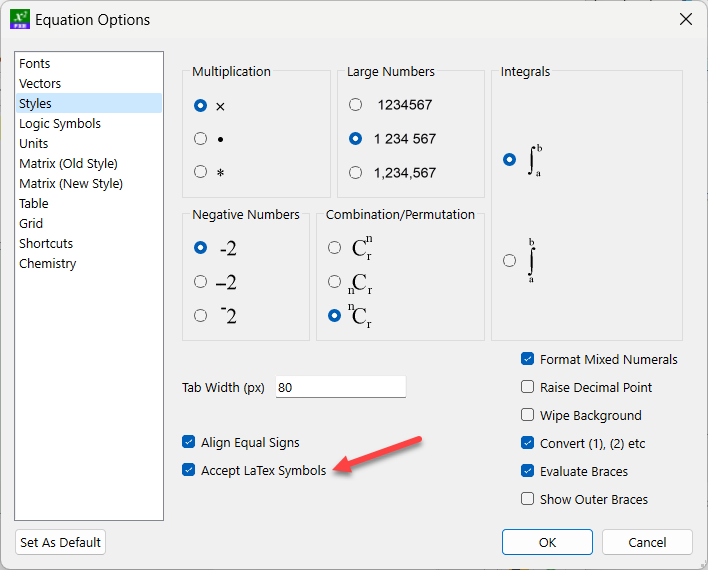
We have also added support for the direct use of some LaTex commands. This allows you, for example, to type something like A \cup B and FX Equation will automatically replace the \cup command with a union sign.

Using LaTex symbols is a user selectable option.

Posted in Uncategorized | 1 Comment