
This new feature was inspired by a question from an EmPower student.
In FX Draw you have always been able to overlay a set of axes with a freehand, smoothed line (but the resulting line is not “part” of the graph). There has not, however, been a way of drawing a smoothed line over an FX Graph graph.
We have now added a new feature to both FX Draw and FX Graph that allows you to explicitly enter a smoothed line into the graph tool.
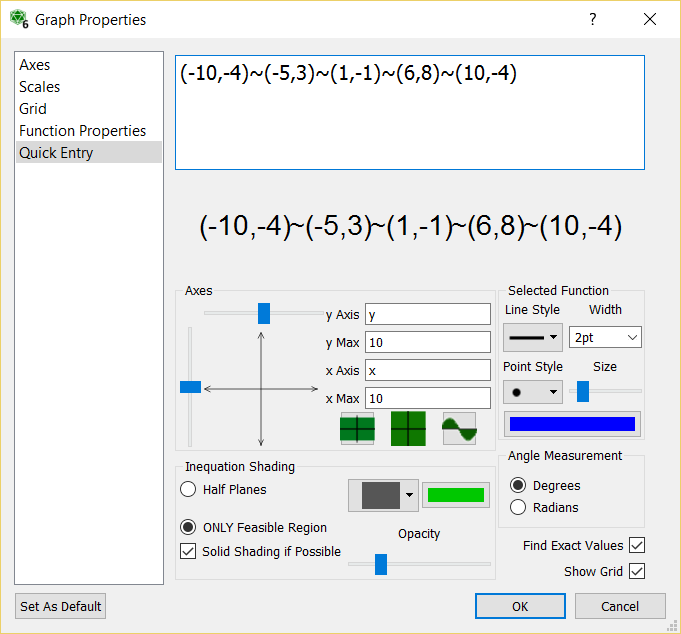
If you join points with a tilde (~), the graph tool will draw a smoothed line joining the points.
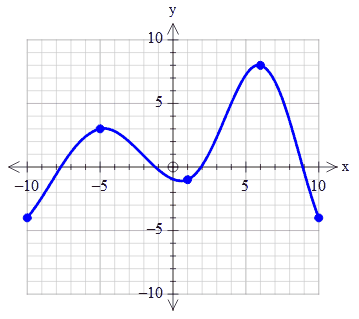
For example, if you enter (-10,-4)~(-5,3)~(1,-1)~(6,8)~(10,-4) as your function, the graph tool will draw this graph.
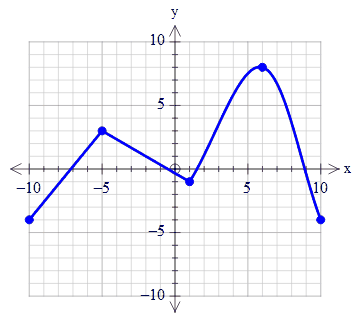
You can mix ~ and + in the same function.
(-10,-4)~(-5,3)+(1,-1)~(6,8)~(10,-4)
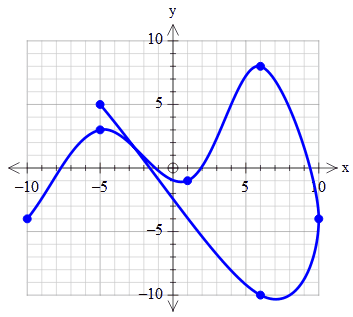
The smoothed curves do not have to be left to right. In other words, they do not need to represent a function.
(-10,-4)~(-5,3)~(1,-1)~(6,8)~(10,-4)~(6,-10)~(-5,5)
The resulting line is guaranteed to pass through the listed points. You can also reduce the size of the points so that they do not appear as marked points.
Discover more from Efofex News
Subscribe to get the latest posts sent to your email.


 Efofex News