
We have introduced a new way to format grids, using a LaTex style formatting string. The new system allows you to control the horizontal alignment of each column individually as well as allowing full control over the lines on the grid.
grid(opt(|C|NNN|RL01) … data goes here)
In this example, we are formatting the grid using the string
|C|NNN|RL01
Some of this string will be familiar to users of LaTex and some will not. First up, lets look at a slightly different string that would be understood by LaTex
|C|RL|
This string determines the horizontal alignment of three columns (Centered, Right aligned and Left aligned) and three vertical bars show where lines should be drawn on the grid. This formatting string would allow you to produce this grid.
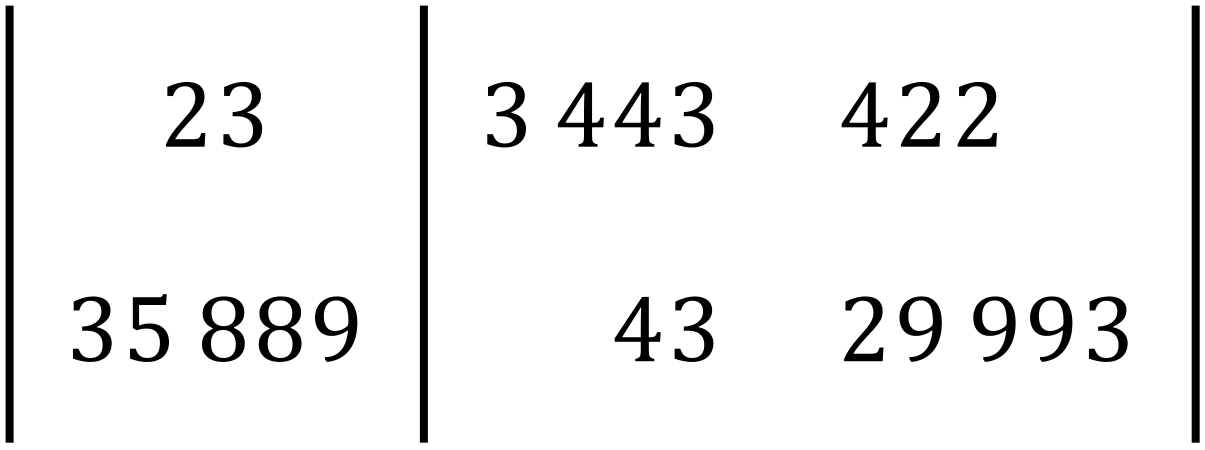
Note that the first column is centered, the second column is right aligned and the third column is left aligned – with lines in the appropriate positions.
Efofex Extensions
We have extended the LaTex standard in two ways:
- We have added a N(umber) alignment option
- We have added the ability to mark horizontal lines.
Number Alignment
Number alignment aligns the decimal points of numbers.

Marking Horizontal Lines
Each row can be marked with 0, 1 or 2 lines, so 0211 will produce the following horizontal lines
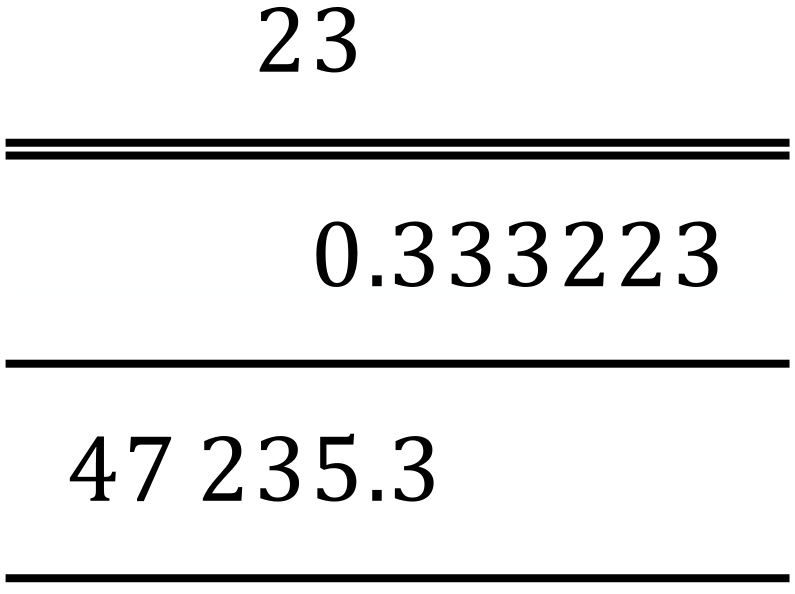
You can also use – for single lines and = for double lines. This means that the grid above could be defined by 0=– if you wish.
Discover more from Efofex News
Subscribe to get the latest posts sent to your email.


 Efofex News