New RangeEx and PrimeEx Commands

We have added two commands to Efofex Parameters that allow you to create algebraic questions with less hassle.

Often, you will want to create a question that operates with both positive and negative numbers, but you need to exclude 0 and maybe 1 and -1. For example you might want to create a question where the parameter is the used as the denominator of a fraction and need to exclude zero.

The RangeEx and PrimeEx commands allow you to create sets of possibilities that satisfy this need.

For example:

$p=rangeex(2,5) will select a value for $p from the set of values {-5, -4, -3, -2, 2, 3, 4, 5}

Notice that the numbers from 2 to 5 are included as well as the associated negative values. The values -1, 0 and 1 are excluded from the list.

The PrimeEx command operates in exactly the same way but is limited to prime numbers and their negatives.

$p=primeex(2,10) will select a value for $p from the set of values {-7, -5, -3, -2, 2, 3, 5, 7}

Posted in Uncategorized | Leave a comment

New Exact Display Mode and Command

We have added a new exact display mode to Efofex parameters.

We have also added the ability to select the display mode from the Parameters toolbar in FX Equation.

Changing Display Modes

When you set FX Equation to the Exact display mode, rational numbers will be displayed as simplified fractions and surds can also be displayed.

Various Calculations in Exact Mode

If you create a calculation that parameters cannot resolve exactly, the result will be shown as a decimal. You also have the option to display exact values involving surds using only prime surds. For example, the result of the last calculation above can be shown like this.

We have also added an exact command that can display the exact result of just part of a calculation. This is useful if you need the overall display style to not be set to exact.

In the example above, the overall display style is set to decimal and we have included the exact command only for the final calculation.

The exact display style and command make creating some solutions much simpler.

Posted in Uncategorized | Leave a comment

New Factor Command

We have added another way to define a parameter

$a=factor(value)
$a=factor(value,low,high)

When you regenerate a parameter defined with a factor command, $a will be allocated a random value selected from the factors of the number you have selected.

For example

$a=factor(72) will mean that $a is randomly selected from the list {1, 2, 3, 4, 6, 8, 9, 12, 18, 24, 36, 72}

The low and high values (which are optional) allow you to restrict the factors selected.

$a=factor(72,10,40) will mean that $a is randomly selected from the list {12, 18, 24, 36}

Posted in Uncategorized | Leave a comment

New Pronumerals Command

We have added a new pronumerals command to Efofex parameters. You can now define a parameter like:

$x=pronumeral()

This will randomly select a pronumeral from a list of acceptable pronumerals. In this case $x might be turned into a,b,c,… x,y,z with some options (like i and o) omitted. This allows you to create algebraic questions with varying letters.

If you define multiple pronumerals in one set of parameters, the pronumerals will always be sequential.

$x=pronumeral()
$y=pronumeral()
$z=pronumeral()

You might end up with the three pronumerals being a, b and c OR x, y and z OR f, g and h for example.

Posted in Uncategorized | Leave a comment

Introducing FX Library (Beta)

As we have been working with the new parameter system to create self-modifying documents, we have created a small library of documents which would be useful for all teachers. Work on the library is slow at the moment (mainly because we keep finding ways of improving the system!) but will accelerate as the parameter system becomes more refined.

In the long run, we want the library to become a massive resource of pre-written materials, most of which will be parametised, that will be available to all FX Draw Tools subscribers. Imagine being able to access tens of thousands of questions, all able to self-modify using parameters, including fully worked solutions. We are very excited about it!

As an Efofex Insider subscriber, we are giving you early access to the library. At the moment there are only about 40 documents available but they are free to use and you can begin to see the full power of the parameters system.

You can view the library at

FX Library

Posted in Uncategorized | Leave a comment

New “No Repeats” Option on Parameters

As we have been creating questions with the new parameter system, we noticed that we were often seeing issues that were caused by a parameter value repeating. For example, if we created the following parameters…

$p=range(1,10)
$q=range(1,10)

We usually wanted the variability but did NOT want the two parameters to be the same value.

We have now added a No Repeats option to the parameter screen to address this issue. No Repeats is on by default and just prevents $p and $q from being assigned the same value. It has greatly simplified the creation of many questions.

Posted in Uncategorized | Leave a comment

New Prime and Composite Commands for Efofex Parameters

We have added new prime and composite commands to Efofex parameters. You can now define a parameter which is guaranteed to be a prime number like this:

$p=prime(1,100)

$p will be a randomly selected prime number between 1 and 100. The composite command uses the same notation.

Prime numbers are particularly useful for designing parametised algebra questions.

Posted in Uncategorized | Leave a comment

New Newsletter – Efofex Insiders

We have created a new newsletter – Efofex Insiders – which is where you will publish all of the technical changes that go on. This is the sort of information that is crucial and interesting to a subset of our customers. Most of you probably do not want to know!

So… if you are a bit of an Efofex guru and want to keep up to date with all of the latest features and changes (particularly with the exciting changes happening with Efofex Parameters), sign up now!

You can sign up here…

Subscribe to Efofex Insiders

Efofex Insiders will be a more active list and you can expect to see articles published most weeks. The digest will be mailed out Monday mornings. Just so you know what you are getting into, we have included a sample article below.

New Prime and Composite Commands for Efofex Parameters

We have added new prime and composite commands to Efofex parameters. You can now define a parameter which is guaranteed to be a prime number like this:

$p=prime(1,100)

$p will be a randomly selected prime number between 1 and 100. The composite command uses the same notation.

Prime numbers are particularly useful for designing parametised algebra questions.

Efofex Insiders is all about providing fine detail without annoying most of our customers. Subscribe now! Efofex Insiders

Posted in Uncategorized | Leave a comment

Welcome to Efofex Insiders

Welcome to the new, Efofex Insiders news blog. We have repurposed our old Support blog to provide a news service for more technically minded users. If you like knowing all of the “ins and outs” of Efofex products, and want to keep up with all of the latest changes, this is the blog for you!

Efofex Insiders also gives you much more scope to influence the development of new features. Your comments and ideas are important to us. History has show us that the best ideas are often the result of a random “It would be great if…” comment from a user.

Join the blog today!

Posted in Uncategorized | Leave a comment

New Feature – Voronoi Diagrams

Due to the topic’s inclusion into the IB program, we have added Voronoi diagrams to FX Draw and FX Graph. This new feature has been included into software releases dated after November 5 2020.

If you do not know of Voronoi diagrams, you can find more information here.

https://en.wikipedia.org/wiki/Voronoi_diagram

Note that we only implement the Euclidean distance version of Voronoi diagrams.

Even if you do not teach the IB course, Voronoi diagrams are a fertile source of ideas for investigative activities related to coordinate geometry.

Using Voronoi diagrams is easy.

  1. Create a graph.
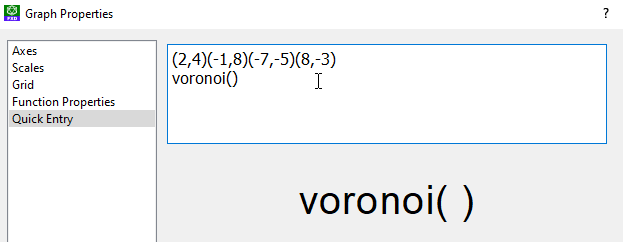
  2. On the quick entry screen, type any fixed points you want to include in the diagram.
  3. Make the final function line Voronoi()

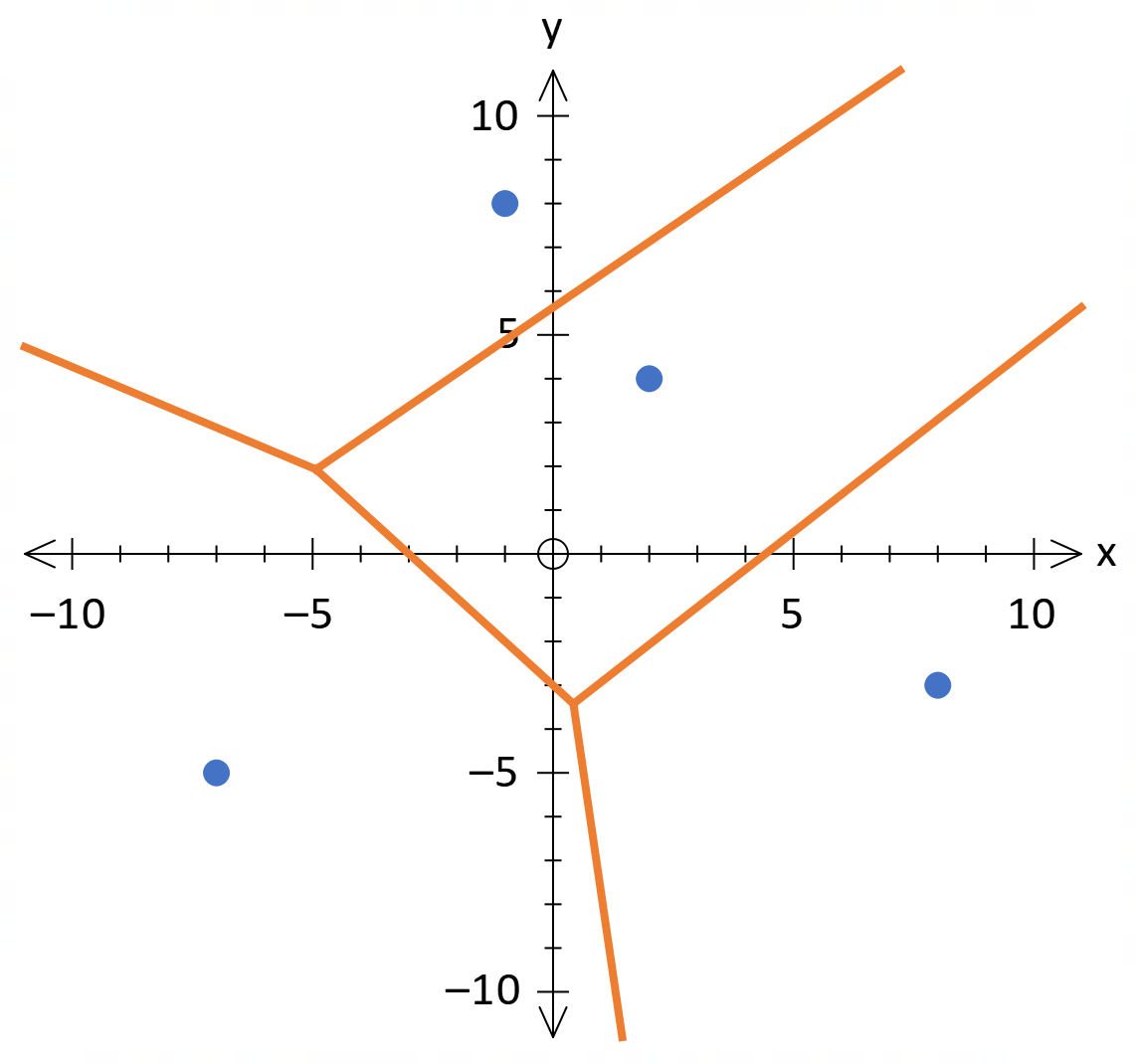
4. When you return to FX Draw, the Voronoi diagram will be automatically drawn.

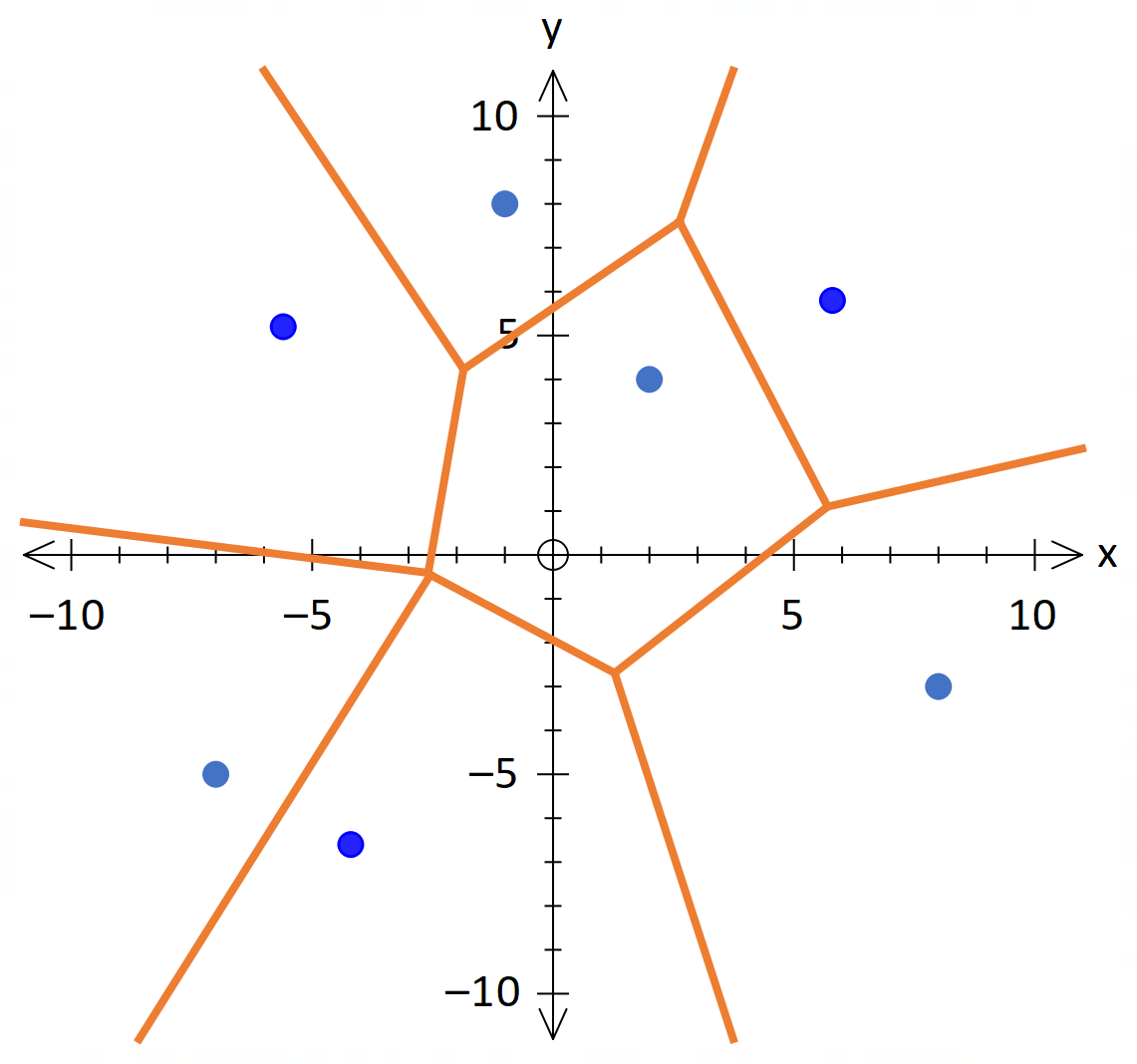
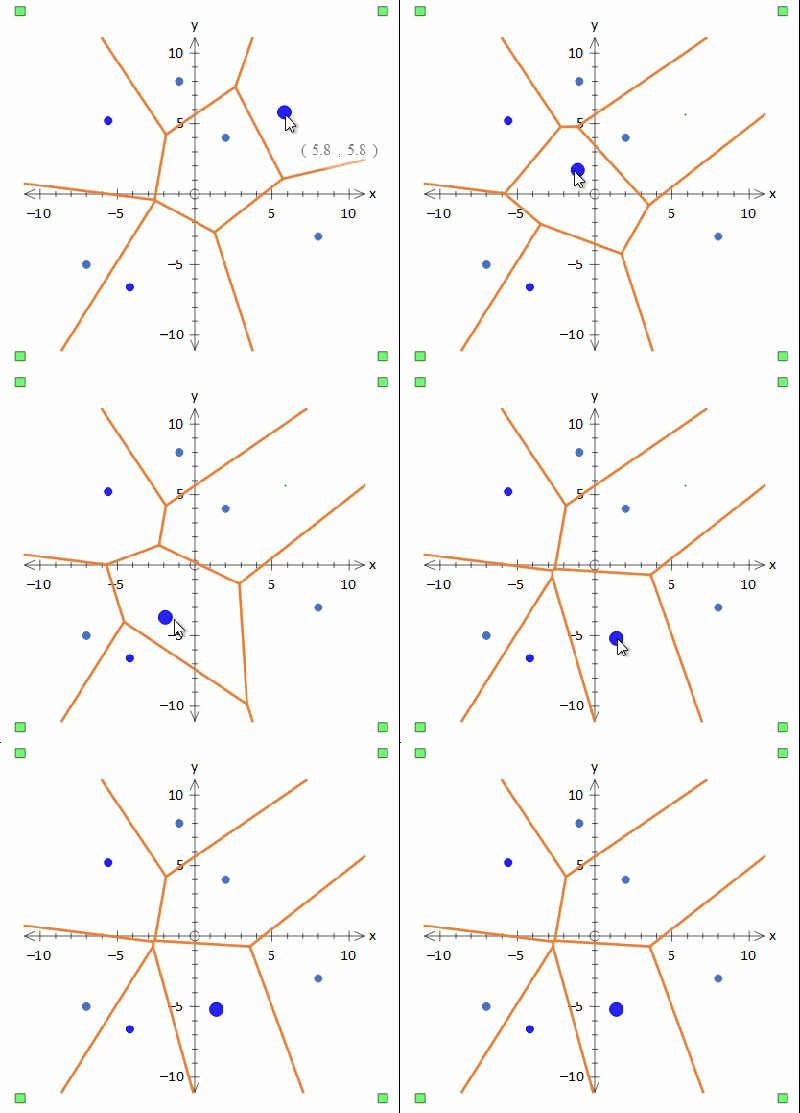
Now you can select the marked point tool and add more points. The diagram will be redrawn interactively.

Marked Points are versatile as you can select and move them dynamically.

Thanks to MM from Pembroke in South Australia for the suggestion!

Posted in Uncategorized | Leave a comment