Perpendicular Angle Marks Not Drawing Correctly?

Question:

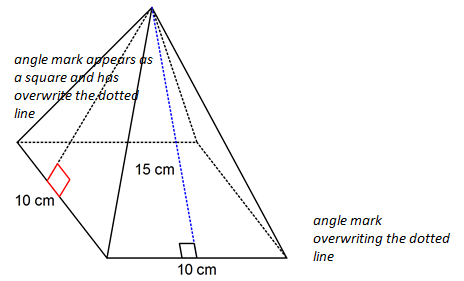
Why are these perpendicular angle marks being drawn as squares? I just want two lines.
Answer:

Although it is not obvious from your diagram, this is because you are drawing shaded angle marks and the shading has been set to white. When angle marks are shaded, they draw the complete square.
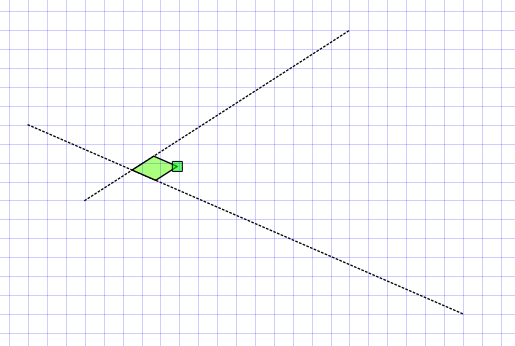
Here I have marked an angle as perpendicular and shaded it. In your case the shading is white but I have made it green so that you can see it. To get a normal perpendicular mark, select the angle mark (as shown above) and change the shading to none.

When there is no shading attached to the angle mark, FX draw will only draw the two lines rather than the square.

Posted in Draw | Tagged , | Leave a comment

Marking Angles

Question:

The angle marking tool is not allowing me to mark the angle I want. How can I fix this?

Answer:

I think your question is relating to this situation – where you are trying to mark angle ABC but the angle marking tool is always finding ABD or DBC.

Continue reading →

Posted in Draw | Tagged , | Leave a comment

How Do I Shade an Integral to the y Axis?

Question:

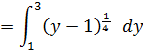
How do I shade the area

what formula should I put in? I have (y=x4+1, y=1, y=3)

Continue reading →

Posted in Draw, Graph | Tagged , | Leave a comment

Drawing a Semicircle

Question:

How do I draw a semicircle?

Answer:

There are a few options but probably the easiest way is to use the arc defined by centre and two end points tool.

Continue reading →

Posted in Draw | Tagged , | Leave a comment

Finding Integrals Between Two Curves

Question:

Can you show me how to shade the area between the curves step by step?

Answer:

FX Graph/Draw can only find integrals between functions and the red curve is a relation. To get what you are after, we need to add a function that FX Graph can use. In this case, the function is y=sr x. Continue reading →

Posted in Draw, Graph | Tagged , | Leave a comment

How Do I Get This Object Exactly Where I Want?

Question:

I am trying to align this text box but it keeps jumping as I move it. I cannot place it exactly where I want.

Answer:

As you move things around, FX Draw will lock on to the background grid and objects like your text box will move in 5mm (or your default grid size) increments. This can make it difficult to align things exactly with something already on screen.

The solution is to hold down the Ctrl (control) key as you move things around. FX Draw will ignore the background grid and you can align things to pixel perfection.

Posted in Draw | Tagged , | Leave a comment

Shaded Background Behind Text

Question:

Is it possible to make an opaque background for text?

Answer:

Text/equation boxes can have shading applied. Just select the text box and change the shading using the top toolbar.

Text attached to lines cannot have a shaded background.

Posted in Draw | Tagged , | Leave a comment

Adding Perpendicular Marks to Altitudes


Question:

I’m using your gallery image of a rectangular pyramid and working to add details to it. How can I add a dotted line that can serve as an altitude? I can draw the line, but I can’t get the little square sign to hang at the bottom. I’ve tried to draw two short lines to make the square symbol, but it is not working quite right. Do you have any suggestions?

Answer:
I would definitely be using the angle tool.

Continue reading →

Posted in Draw | Tagged , | Leave a comment