We have been busy over the last few months, updating our products to run on the latest computers.
New 64 Bit Windows Versions.
We delayed moving to 64 bit versions of our products for many years as we waited for school technology to catch up. 64 bit computers are now just about universal so we have finally made the move. The new versions are faster and have fewer limitations that were forced on us by the old systems. For example, FX Draw now offers a 31cm by 43cm (slightly over A3) size drawing canvas whereas old 32 bit versions just managed a 30cm by 30cm canvas.
New Apple Silicon Versions
Our new Mac versions support both Intel chips and the new Apple M1/M2 chips natively. Anyone with a newer Mac will notice significant speed improvements with the newer versions.
The new versions, along with the many improvements we have made recently, mean that now is a good time to make sure that you are using the latest versions of our products.
We have added a new SelectFrom parameter type that simplifies the process of randomly selecting elements from a list or set.
$s=selectfrom($sourceparameter,number)
To use a SelectFrom parameter, you need to create a “source” parameter that contains the elements you wish to “select from”. The source parameter can be just about anything.
Once we have our source parameter, we can create a SelectFrom parameter
$s=selectfrom($d,5)
This command will randomly select five elements from $d. In this case, we will get back 5 cards from a deck.
One Trick – List All Elements
The SelectFrom command will select from listed values. Some parameters do not list all values automatically. For example,
$s=selectfrom($r,3)
will not produce the results you expect, because range parameters do not “list all values” automatically. To use the selectfrom command with range parameters (and other parameters which do not list all values), you need to list the values using references. The easiest way to do this is to use the $r[] notation.
$s=selectfrom($r[],3)
The addition of the square brackets will cause the range parameter to list all values and $s will contain 3 values selected from this list. You could have also typed something like $s=selectfrom($r[12,54],3) which would select from the 12th element through to the 54th element of the range list.
The SelectFrom parameter is an advanced parameter type that can make the creation of some question types much simpler.
The inline calculator automatically simplifies exact calculations. For example, if you have the display style set to Exa(ct), and perform the following calculation:
{1/4+1/6}
The calculator will return the simplified fraction 5/12
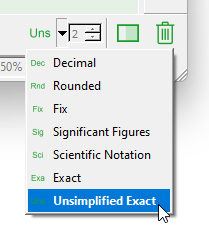
Often teachers do not want to simplify things immediately. Instead, they want to show the unsimplified version and then show the process of simplification. In other words, they would prefer to see 10/24. The new Uns display setting performs calculations without simplification.
Setting the Unsimplified Style
Using Unsimplified Results
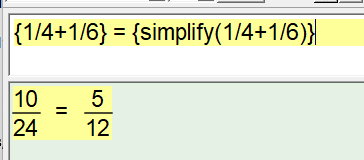
We have added a new Simplify calculator command that allows you to manually simplify unsimplified results. For example, you might enter this:
The simplify command in action
The simplify command will only affect output when you are set to the Uns display style. The simplify command simplifies fractions – not algebra.
Probability
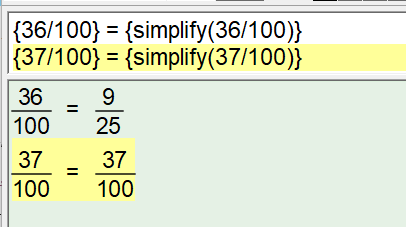
The Uns display style as created to address issues we experienced writing probability questions. Often, when writing solutions, we wanted an unsimplified version of the fraction to highlight the total number of possibilities on the denominator of the fraction. For example, if we had 100 students and were finding the probability that they took a bus to school, we might end up with a result of 36/100. Showing this is important, as is showing the simplified version of the fraction.
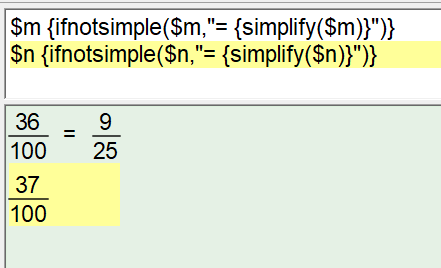
This did, however, create a difficulty! If the solution ended up being 36/100 we want to show the simplified 9/25. If the solution ended up being 37/100 we cannot simplify and would prefer to not show a redundant simplification.
The second line includes a redundant simplification!
The need to selectively show information depending on whether an expression can be simplified led to the final part of the new feature.
IfNotSimple
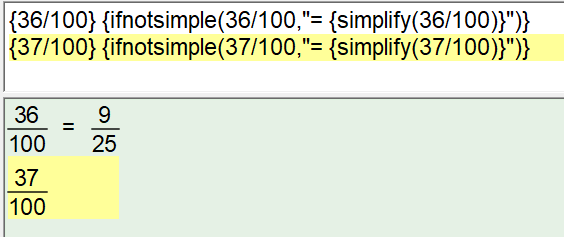
The IfNotSimple calculator command only outputs text if the input is not simple.
ifnotsimple(expression,”I need to be simplified!”)
This command, combined with Simplify, solves the probability problem.
IfNotSimple in action
Normally, these commands will be used on parameters rather than raw numbers.
We have added a calculator command which can find the MostCommon element of a set.
For example, if we create an Explode parameter such as:
$m=explode(“MATHEMATICAL”)
(Remember that an explode parameter takes a string of characters and explodes it into individual characters so $m will contain {M,A,T,H,E,M,A,T,I,C,A,L})
The calculator command:
{mostcommon($m)}
will contain “A”, which is the most common element in the set.
If there is more than one “most common” element, all of them are returned by the MostCommon command. For example, if $m = explode(“MATHEMATICS”), {mostcommon($m)} will return {M,A,T}
Efofex has long provided students with special needs with free licenses for our products. This has proved especially useful with FX Equation as many students find FX Equation to be the quickest way to input mathematical materials using a keyboard or keyboard analog.
If you have a student who finds it difficult to write mathematics due to a special need, take a look at our EmPower program. We have helped thousands of students over the past 20 years.
One of the main issues our EmPower students face is convincing examining bodies that FX Equation does not provide them with a mathematical advantage in an exam situation. Recent versions of FX Equation, with the inline calculator, have made this more difficult as the inline calculator DOES provide a mathematical benefit to users.
Recently, we added a special Exam Mode to FX Equation which removes access to the problematic features and makes the task of convincing examining bodies MUCH simpler.
The new examination mode, and a letter that can be provided to examining bodies, can be found on the EmPower page.
Nearly 20 years ago we were told that FX Equation was the perfect mathematical tool for students who had trouble “writing” mathematics. The ability to just type, with minimal formatting, and have FX Equation automatically format it into readable equations and text is simply unmatched. The same features that make FX Equation the most efficient equation editor for mathematics teachers, makes it powerful for these students.
Since then, we have helped thousands of students who struggle to write mathematics. Students with conditions as diverse as cerebral palsy, quadrilpegia and dysgraphia have all benefited. We have even had a number of students going to higher level mathematics and engineering. Our free, EmPower program has been an outstanding success and is something we are very proud of.
Then came MultiDocs.
One of the main pillars of the MultiDocs system is the inclusion of an inline calculator which permits you to automate many of the calculations you need for solutions. This inclusion has proved problematic for examining bodies who need to ensure that any approved accommodation does not provide an unfair advantage to students. The inline calculator definitely provides such an advantage.
To address this, we have now added an “Exam Mode” to FX Equation which disables any problematic features. This will make it much easier for our EmPower students to gain approval from examining bodies.
You can find more information about our EmPower program, and the new Exam Mode, on our Empower page.
It has been a few months since we last wrote, but we have been busy! MultiDocs are moving on and are becoming simply the most efficient way to design and use mathematical materials.
If you are interested in creating MultiDocs, we recommend that you look at our Efofex Insiders newsletter where we announce some of the more esoteric additions to the capabilities. Recently we have added articles on new parameter types (which allow you to select from sets or divide numbers into random “buckets”), new calculator commands (which allow you to extract numerators and denominators or find the most common element) and a new display style (which allows you to show simplification of calculations).
If you want to turbocharge your productivity, MultiDocs are simply unmatched! Take a look at them today.
We have added the ability to automatically format large numbers.
By default, the equation tool will now use narrow spaces to break up large numbers into groups of three. Alternatively you can use commas or no format. Other combinations will be considered on an as-need basis.
You do not need to apply any manual formatting. Your selected formatting will be applied automatically.
The new display style is particularly useful for parameters as you have no opportunity to manually format a large number.



 Efofex News