
Current versions of our products no longer upload copies of your graphics to our servers for backup. This should have no impact on your use of Efofex products. If you mostly use our products in Microsoft Word, you can safely ignore the rest of this post.
For the last decade, our products have been backing up your graphics to our servers (if possible). This was done for two reasons:
- It provided a backup of your work.
- It made it easier to use our products in a cross-platform way as it allowed for easier movement of graphics between Windows and Mac machines.
Over the last few years, this feature has become significantly less valuable for two reasons:
- If you are using MultiDocs or Classic Mode in Word, your data is now stored within the document and does not require “backing up”.
- School security policies have prevented the system from operating at all in many school situations.
As the feature is no longer central to our products, and was causing some issues in school situations, we have now decided to turn it off by default. For the vast majority of our users, this will have NO IMPACT on their use of our products and you are unlikely to even notice the change.
If your workflow still requires you to use the online backups, you can turn it on by choosing Preferences from the Tools menu and going to the Advanced tab.
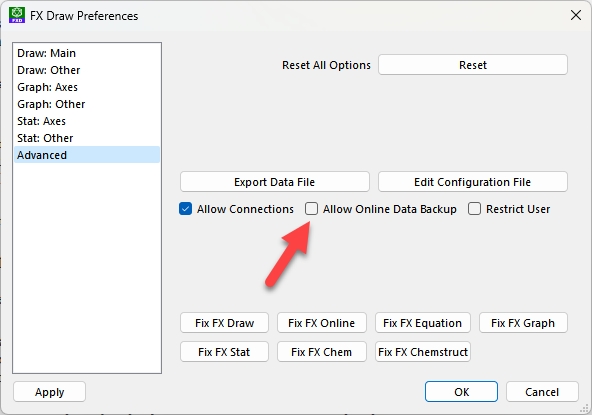
Place a check mark in Allow Online Data Backup and the system will operate as it has in the past.
Discover more from Efofex News
Subscribe to get the latest posts sent to your email.


