Lots Of Videos

Did you know that we have added nearly seventy training videos to our collection over the last year? The publishing rate is picking up as well. Seventeen of the videos have been published in the last month! Each of the videos provides you with focused information on an aspect of the software.

So How Do You Find The Videos?

Lots of ways. Nearly two hundred people have subscribed to our YouTube channel which you can find here.

Efofex Training YouTube Channel

The channel will automatically notify you when new videos are published.

Alternatively, you will often find video links at the bottom of posts announcing changes or updates. For example, there is a video at the bottom of the post on drawing box plots using a 5 point summary.

Probably the best way to find videos, however, is to use the new “How Do I Create” box at the bottom of every product.

If you type, for example, Box Plots into this box you will be given a list of pages from our help site that talk about Box Plots. All of our videos have been linked into those pages so you can get information on what you want to do at the moment you want to do it.

We are currently producing videos at a frantic pace and linking to them from our help pages. It has never been easier to access training!

Posted in Uncategorized | Leave a comment

FX Draw – Improved Compass Tools Available

FX Draw has included compass-like tools for many years, but they have always been a bit difficult to use. The latest version of FX Draw (V7.003.7) now includes greatly improved versions of the compass tools.

Circle Compass

Arc Compass

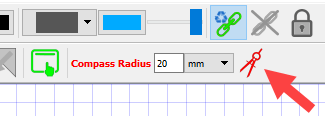
When you choose either the compass circle or compass arc tool, the top toolbar now changes to show you the current setting for the compass radius.

jomnmaeggnidmofc2

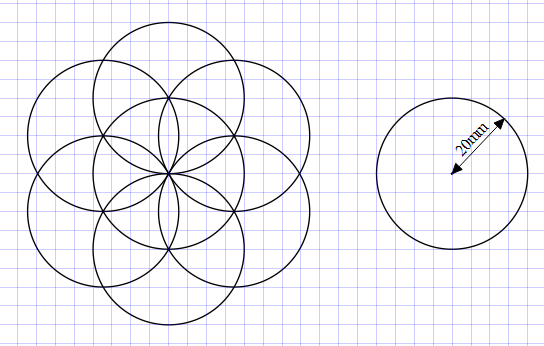
The compass radius is currently set to 20mm and any compass circle or compass arc drawn at the moment will be drawn with exactly that radius.

nnmjalndkodgmoob2

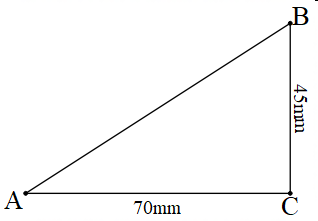
You can explicitly change the radius to any measurement you want, but sometimes you will want to set the radius to something defined in the diagram. For example, I might wish to set a radius to be the length of AB.

olcbmnhapalabecd2

Rather than breaking out Pythagoras, I can measure my radius on the diagram. Push the compass button on the top toolbar.

okbdcdloaoedjmbg2

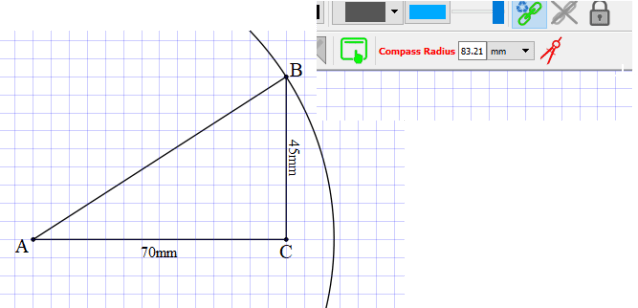
You can now draw a standard circle with the centre at A and moving out to B. Once the circle is drawn, the measured radius is automatically entered into the Compass Radius box, ready to be used on subsequent circles.

cbeemfakcppoidfn2

Video – Using the New Compass Tools

Posted in Uncategorized | Leave a comment

New Axes Style Available

The latest versions of FX Draw (V7.003.7), FX Graph (V7.003.3) and FX Stat (V4.003.3) have added a new style of axes that can be used for any graph type.

The new style removes all of the axes and just shows the scale on two sides of the plane. You can choose the style on the Axes page of graph properties.

This graph style has been requested on numerous occasions by a number of different users.

Posted in Uncategorized | Leave a comment

Graphing Box Plots From 5 Point Summaries

The latest versions of FX Draw (V7.003.7) and FX Stat (V4.003.3) include the ability to graph a box and whisker plot using just a 5 point summary.

By default, if you graph a data set which includes exactly 5 data points, our products will interpret those 5 data points as a 5-point summary.

Note that the five points do not need to be in order. In this case, the 25 and 32 are reversed.

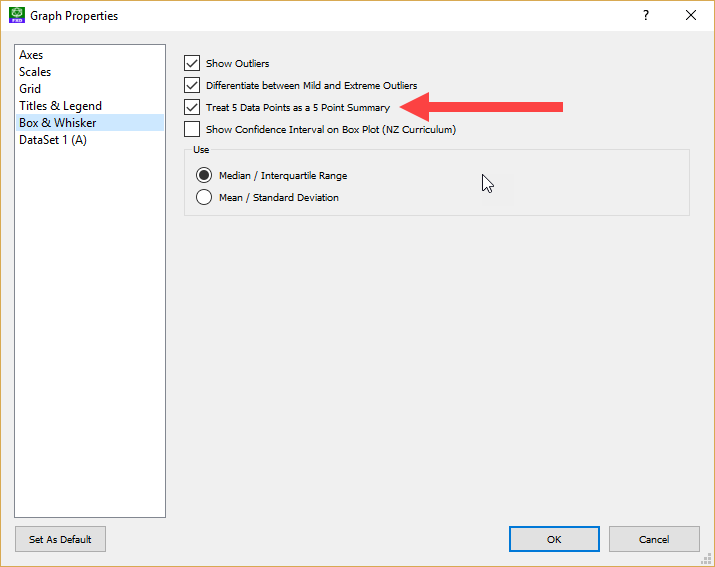
The new feature can be turned off in the box plot options but we anticipate that this will rarely happen as the point of a box plot is to summarise a large data set. Most teachers would never even contemplate creating a box plot for just five data points.

The new feature is available now and will make drawing box plots that bit simpler. The feature is yet another user suggested option. Thanks Charlton!

Video – Drawing Box Plots Using a 5 Point Summary

Posted in Uncategorized | 1 Comment

What’s New in FX Draw

We have put together a short, 5 minute video to show you some of the new things that we have done with FX Draw over the last eighteen months. If you haven’t been keeping up with the new features, now is the time to take a look (the link is below). Just don’t forget to download the latest version of FX Draw to access the new features.

In the video, you will notice a night shot of the new Matagarup bridge in our home town of Perth Western Australia. We would love to say that the design was inspired by our logo but it was actually inspired by two flying swans. Maybe we will just have to refer to it as “Efofex Bridge” in private!

https://www.youtube.com/watch?v=pVaUU0_PWyg

Posted in Uncategorized | Leave a comment

FX Draw – New Pascal’s Triangle Tool

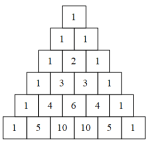
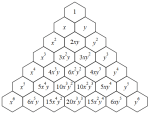
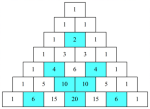
We have added a new Pascal’s Triangle tool to FX Draw. The new tool is available in the new 7.003.3 release which is online now. We have uploaded a short video about the tool to YouTube.

https://www.youtube.com/watch?v=UYluNP001v8

You can access the tool from the FX Draw toolbar

Select the tool and sweep out a rectangle. Your Pascal’s triangle will appear. There are lots of available options. All of these graphics have come from the new tool.

This, like many other changes made to FX Draw, is the direct result of a suggestion from a user (thanks Jacci!) If you have an idea for a great new feature, tell us!

Video – Using the Pascal’s Triangle Tool

Posted in Uncategorized | Leave a comment

Help System Changes – Better Help, Easier to Find

Today we released a new version of FX Draw which includes a new way of accessing Help – the “How Do I Create?” box.

If you have something that you want to create but do not know how to do it, type it in here. For example, you might type in “Network Diagrams”. When you press Enter, your browser will do a Google search on our Help documentation. The top result looks like this.

If you visit the page, you will see the other major change we have implemented, we have linked all of our training videos directly into our Help system.

If you click on the video you get training that is immediately useful to you.

The “How Do I Create?” box will appear on all of the products as we release new versions.

Posted in Uncategorized | Leave a comment

IMPORTANT – New Versions Uploaded

We have just uploaded significant new versions of ALL of our products. The new versions implement a number of new general features, like the expanded notification system. More importantly, they collect a number of previously released, smaller updates into one file.
Many products have experienced a large number of smaller updates since their last big release. FX Draw, for example, has had twenty five small updates! Each one of these updates fix small issues or make small improvements but the net result is huge!

Now is the time for all subscribers to visit our downloads page (http://www.efofex.com/Downloads.php) and download fresh versions.

Posted in Uncategorized | Leave a comment

FX Equation & FX Chem – VB Script Problems

A small number of schools disable the Windows Script Host service on their computers (as a security measure) and this impacts on users of FX Equation and FX Chem.

If you are impacted by this, you will see a number of messages informing you that Windows Script Host has been disabled every time you use FX Equation or FX Chem from inside Word. You will also find that your equations are not being lowered.

The BEST solution to this issue is to get school IT departments to turn the host back on, or at least exempt the Efofex files, but we fully appreciate that teachers usually do not win those arguments! As an alternative we have made two changes to suit the needs of the affected teachers.

  1.  FX Equation and FX Chem will now only inform you that Windows Script Host has been disabled ONCE, the first time it tries.
  2. We have re-implemented a manual lower button on the Word toolbar. This will allow you to manually lower each equation as you create or edit it.

This solution is not ideal but is a pragmatic response to the changes made by some schools.

Posted in Uncategorized | Leave a comment

Expanded Notification System

We have upgraded the notification system we introduced a few months ago. It now includes notifications of new versions of the products. As part of this upgrade, we have removed our old update checker.

Over time, our update checker has been blocked by more and more school IT departments as it forced them to update old copies. While we understand that IT departments prefer to maintain a stable environment, this did mean that an increasing number of our users were not aware of new versions that provided significant new features or fixes for old problems. One reason why our update checker was blocked was because it was intrusive and popped a window up when it found a new version.

The new notification system will simply show you a small flag when it finds a new notification. You choose when to look at the messages. It is far less intrusive.

Update notifications provide you with a download link and a link to what’s new in the version. You can make an informed choice about whether to update.

kbioleajebbfbbll
Our notification centre will quickly become the single, best source of information about what is happening to Efofex products.

Posted in Uncategorized | Tagged , | Leave a comment