FX Draw – New On-Screen Keyboards for Touch Computers

A lot of our customers are beginning to use touch-enabled computers in their classroom. Computers like the Windows Surface can massively increase a teacher’s productivity and we are working to keep providing tools that are relevant to modern teachers.

FX Draw V7.003.1 introduces context-sensitive on-screen keyboards to support touch-enabled Windows computers.

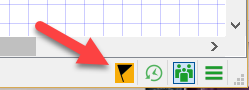
You turn on touch keyboards with this new toolbar button.

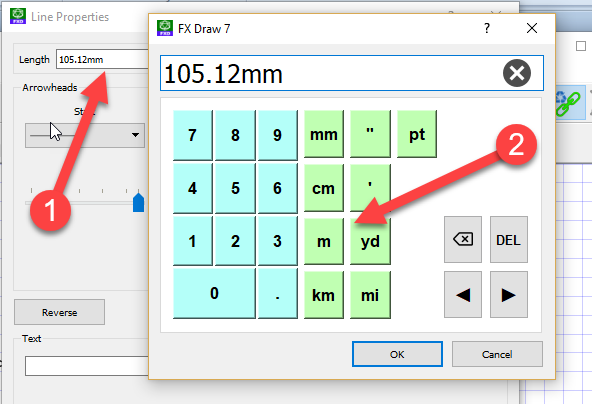
When you try to type in any location that requires a keyboard an on-screen keyboard will pop up. In this example we are typing a measurement and get a specialised measurement keyboard.

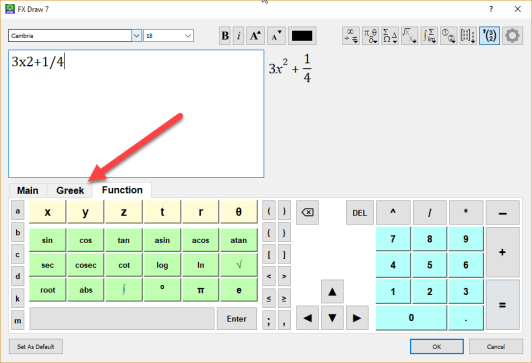
The system includes a full, on-screen equation editor that includes a selection of keyboards that you can use.

bndpeehnjmgnolfk

Touch keyboards will be added to the other products in the next few months.

Posted in Uncategorized | Tagged , | Leave a comment

FX Sketch Beta Release

We are really excited to announce the beta release of FX Sketch, our new way of interacting with the FX Draw engine.

This video provides you with a quick overview of what is possible.


There is very little to learn about using FX Sketch, but we have added an FX Sketch quick reference guide to the Help menu.

FX Sketch is still in beta and we are always very interested in feedback on how it is doing!

Posted in Uncategorized | Leave a comment

New Edge Options in FX Draw

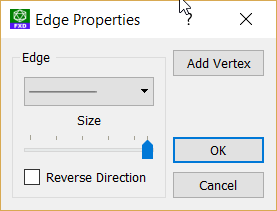
You now have a greater number of options that you can apply to edges of polygons. Previously, if you right-clicked on the edge of a polygon, you would be given these options.

In the latest version of FX Draw, you now can add text to each edge of a polygon. The text can, if you wish, show the measurement of the edge.

The new edge options were added as part of the FX Sketch upgrade to FX Draw.

Posted in Uncategorized | Leave a comment

New Notification System

The next releases of our products will include a new notification system. This will give you timely notifications of any changes we make. All you need to do is to look for the flags…

The black flag on an amber background means that there are new notifications available. If you push the flag button, you will open the Notifications screen.

Read the articles you want and dismiss the notifications when you are done. Quick and easy.

Posted in Uncategorized | Leave a comment

Efofex at QAMT – Sunshine Coast PD Opportunity

Paul Hooper, managing director of Efofex, will be at the QAMT conference, Brisbane SHS,  on June 30 and July 1. We have offered to present a “Making the Most FX Draw” session at the conference and are currently waiting confirmation from the conference organisers to see if this is possible. Either way, if you are at the conference, come and say hello.

We will also be spending the two weeks prior to the conference touring the Sunshine Coast and are available for in-school professional development sessions during this period. If you are interested in organising a session, contact info@efofex.com.

Posted in Uncategorized | Leave a comment

New Sine/Cosine Curve Drawing Tool for FX Draw

The new FX Sketch allows you to draw freehand sine and cosine curves, so we decided to add a sine/cosine curve drawing tool to FX Draw. The new tool will be included in the upcoming FX Sketch release of FX Draw.

Take a look at this short video to see the new tool in action.

Posted in Uncategorized | Leave a comment

FX Sketch – Sneak Peek

FX Sketch
We have been busily working on a fantastic new addition to the Efofex stable – FX Sketch. Click on the image to watch a very short video. More news next week!


Posted in Uncategorized | 2 Comments

Global Scales

We introduced the idea of a global scale with our dimension tool.

You can change the global scale and all dimensions were remeasured using the new scale. For example, if we change the global scale to 4:1, the dimensions now appear as,

Unfortunately, the global scale was hidden away and only affected dimensions. In the latest version we have added the global scale, and unit selection, to the main toolbar. More importantly, the scale now affect ALL measurements produced by FX Draw.

Posted in Uncategorized | Leave a comment

New Dilation Option

We have introduced a new dilation option that allows you to scale selected objects.

1. Draw an object and select it.

2. We have added another control button to your selection. Grab this to scale the whole object.

3. Release the mouse button

This feature was the direct result of a suggestion from a customer. If YOU have a great idea for something FX Draw could do, send it to us. You too can help FX Draw become a better product.

Posted in Uncategorized | 1 Comment

Welcome to the New (Southern Hemisphere) School Year

Efofex would like to wish all of our southern hemisphere customers a most successful new school year. We have lots of new features planned for you, including what is probably the most exciting new FX Draw feature we have ever produced – but more on that later.

In the short term we have added a number of new features to FX Draw, most of which have come directly from teacher suggestions. We will discuss those in the next few articles.

We hope you all enjoy your 2018!

Posted in Uncategorized | Leave a comment