Secure Website

We have recently upgraded our website so that it supports the https:// secure web protocol. We had previously had secure pages for credit card payments but now the whole website can be accessed using the secure protocol. Even though the change makes little difference to how secure our operations are, this is the way that the web is moving and we have to move with the times.

The change will have minimal effect on how you use Efofex in the short term but eventually we will change the website so that access MUST be through https. This WILL affect how our new cloud products access registration information and data.

New versions of all of our products, that utilize https will be released in the new year. We will not force https access for six months so everybody has ample time to move to the new versions. In the long term, you will need to have the newer versions to use the cloud based features.
Posted in Uncategorized | Leave a comment

More Work On Authenticated Proxies

This article particularly applies to Queensland Department of Education customers.

We have done more work on authenticated proxies which are used in a small number of school systems, in particular Department of Education schools in Queensland.

Lots of school systems use a proxy system for their internet. This allows the school to manage internet access and have more control over the sort of information provided to students. Some schools have an authenticated proxy system which will force you to put in your username and password to use any program which accesses the Internet. It is believed that this makes the system more secure but typically users hate the extra intrusion.

Efofex products can be successfully installed into this environment (including EdQld computers) and we have recently made some changes to ensure that the impact on your usage is minimized.

If you think your school uses an authenticated proxy and you have found our products difficult to use in this environment, now would be a great time to download fresh versions.

Posted in Uncategorized | Leave a comment

New FX Draw Tutorial Video Series


Our email tutorial series have been a popular way to learn about our products for many years. We were looking to revamp the series and decided that most of the information was better presented in a video format, rather than written. Work is now complete on the first video lesson set – Introduction to FX Draw.

The video lessons contain all of the information in the old email series, updated for the latest version of FX Draw. They have bee packaged into short, one to two minute videos. You can watch them all in one sitting or pick and choose at will. Watching the full set is equivalent to having one or two hours of intensive professional development training.

The new videos can be found on this YouTube play list

Introduction to FX Draw Video Series

The video series has been released with 38 videos but this will change over time. We have also begun work on new series for our graph, stats and equation tools. They will be coming soon.

Posted in Uncategorized | Tagged , | Leave a comment

Efofex On Tour

At the moment, the Efofex team is in a not so sunny Vancouver as we prepare to attend the British Columbia Association of Mathematics Teachers’ annual conference on Friday. We will be there, in our Efofex jackets, so if you are attending the conference please come and say hello.

We also planned to attend the biannual NZAMT conference in Christchurch. We booked flights and accommodation and proposed two sessions to the conference organisers. We have attended many times in the past and didn’t anticipate any issues. Alas, it was not to be.

Even though our main session was going to be (as always) “How to get the most out of FX Draw”, our sessions were deemed to be commercial and were not permitted unless we were “Gold Sponsors”. Efofex will never be big enough to be a gold sponsor so we have been effectively prevented from offering New Zealand customers support.

We have certainly been to conferences in the past where a major sponsor has been subjected to “ambush marketing” by a competitor who doesn’t pay any money but offers lots of sessions. We understand why a company like Casio would insist on this condition when sponsoring a conference. Having said that, we feel like we are collateral damage in a fight between multi-national companies and, in the end, it is teachers who miss out. We hope that our New Zealand customers quietly suggest to their association that this particular rule be implemented with a little more nuance!

Posted in Uncategorized | Leave a comment

New Offer for Personal Use Subscribers


Our products are basic tools for a mathematics teacher’s job and we believe that schools should be purchasing site licenses so that all of their teachers can use them. We have always tried to encourage this by making our Full Site licenses very reasonably priced and a quite low multiple of the Personal Use licenses. We want schools to be spending their money, not relying on yours.

We have decided to promote this idea even further by offering you a full rebate of your personal use license fee if you convince your school to purchase a full site or distribution license during your subscription period.

That’s right, all of your money back!

Obviously there are a few terms and conditions, but they are not onerous. We wantto give you back your money! All you really have to do is ask (we have included the Terms & Conditions below for your reference.)

You can visit the rebate page to claim a rebate.

Terms & Conditions

  • Only one personal use license fee can be claimed back per school license purchase.
  • Maximum rebate is one year’s personal use license fee.
  • Rebate must be claimed while your subscription period is current.
  • Rebate does not include any third party fees charged to you during the purchase.
  • Rebate will only apply if the school did not hold a current Efofex subscription when you purchased your Personal Use subscription.
  • Rebate will be paid when the school’s invoice is fully paid.
  • Offer only available directly from Efofex and participating distributors.
Posted in Uncategorized | Tagged , | Leave a comment

FX Draw User Interface Changes


We have recently begun work on modernising the user interface of FX Draw. Don’t worry! We will definitely NOT be making wholesale changes that require you to learn something new. We are just trying to make things more useful on more devices.

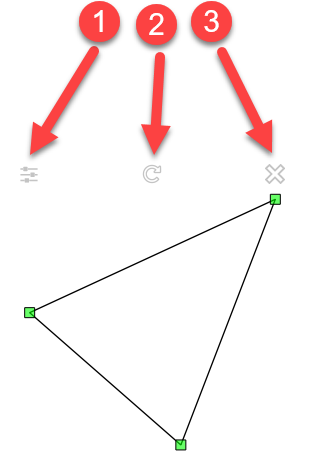
The first change is the addition of on-screen buttons that allow you to delete selections and edit the properties of figures. If you draw a figure and select it, you will see these new buttons.

  • Button 1 will only appear if you have selected a single figure. It allows you to edit the properties of the figure. It is equivalent to right-clicking on the figure (or Command + Click on the Mac).
  • Button 2 is the rotate button re-imaged. The rotate button’s behaviour has not changed but the button now gives you more information about what it does. Remember that not all figures are rotatable so this button will not always appear.
  • Button 3 allows you to delete the current selection. It is equivalent to pressing Del.

Why the New Buttons?

The need to right-click to edit properties and press Del to delete figures makes FX Draw a little harder to use than it needs to be on Mac computers and tablet computers. It also makes it harder to move FX Draw onto new platforms (like the iPad). Adding these buttons makes the interface more accessible to everybody without removing ANY of the functionality you are used to.

Keep an eye on our products over the next few months. There a lot of little enhancements like this one coming soon.

Posted in Uncategorized | Tagged , | Leave a comment

Authenticated Proxy Support


This is one for the more technical of you. It will not affect most people, but those it does will find their lives are much easier.

Our products now support authenticated proxy servers. This will affect you if you have found that our products cannot connect and your school makes you type in credentials whenever a program wants to access the internet.

Previous versions of our products supported proxy servers but failed when authentication was required. This new feature should remove the last impediments to schools using the new cloud versions.

If you use our products as inserted objects in Word (the “old” way), the products are started and stopped every time you create a graphic. This means that credentials need to be supplied every time the program starts. Because of this, our products cache your credentials for 24 hours after you enter them. This will allow you use the products as interactively whilst still allowing for your school’s security settings.

If you have experienced connection issues in the past, our new versions will almost certainly correct them. They are certainly worth a download.

Posted in Uncategorized | Tagged , | Leave a comment

New FX Draw Feature

We have uploaded FX Draw 7.001.16 for both Windows and Mac. This version includes two neat new features that will allow you to modify the font of multiple objects in one command.

1. Change The Font Of All Selected Objects

This command allows you to change the font (and optionally, the font size) of every selected object. This allows you to change every font in one operation.

Many FX Draw objects have text and their own font settings. If you want to change the font of a few objects at once, this can become tedious.

The new alternative is to select all objects and choose Change Fonts For Selected Objects from the Edit menu.

You can change the font and, optionally, the font size. Note that setting the font size is not always appropriate as would affect things like the titles of graphs.

2. Change All Default Fonts

This is a very similar command (available in the Tools menu) which changes the default font for all objects. This will only affect objects created after the change but allows you to standardise on one particular font in all contexts.

Posted in Uncategorized | Leave a comment

New Feature – Option syncing.

We have just uploaded new versions of all Efofex products. There have been a number of small improvements and bug fixes, particularly for FX Draw and FX Stat, but the main feature that has been added to all products is option syncing.

If you regularly use more than one computer to create your work, option syncing will make your life much easier. If you change the default text size for marked points (for example), that new option is automatically saved to the cloud and will be loaded into your other computer the next time you start FX Draw. Option syncing means that you can work across a consistent environment on all devices.

Syncing works between the Windows and Mac versions of the products (for those of you forced into using a platform you do not prefer at school) but differences between installed fonts can cause some issues. If, for example, you set a default font of Helvetica on your Mac, but your Windows machine does not have that font installed, Windows will replace the font with something as close as possible.

Other than that, it should work seamlessly!

Posted in Uncategorized | Leave a comment

New FX Equation Video

If you have ever found yourself reaching for a calculator as you type up equations, the FX Equation calculator tool is for you. It allows you to create worked solutions quickly and easily.

If you are using FX Equation to show how to use the quadratic function (for example) you might already have typed in something like this…

(5.2+sr(5.2^2-4*3.23*1.23))/(2*3.23)

which FX Equation will turn into a fully formatted equation for you. If you actually want to evaluate this, you would probably reach for a scientific calculator and retype everything – which is both boring and slow.

In FX Equation, you can just select this string and push the calculator button. FX Equation will automatically evaluate your selection and you can paste the result directly into your next line.

We have uploaded a video of the process. You can find the video here.

Posted in Uncategorized | Leave a comment