PowerPoint Add-In (Windows)

We have released a new PowerPoint Add-In for PowerPoint 2010 and later.

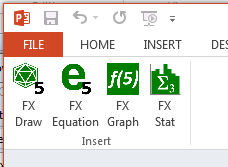
The Add-in creates an Efofex tab in your PowerPoint ribbon. This tab provides an easy method to insert Efofex objects into your PowerPoint presentation.

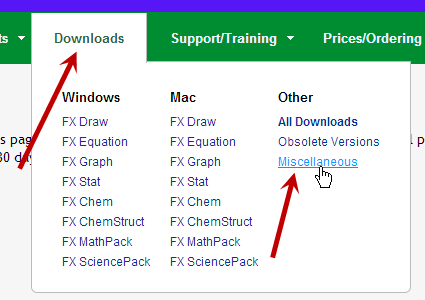
The Add-in is available for download from our download page. Choose the Miscellaneous option.

The direct link to the file is FX PowerPoint Integration

Posted in Uncategorized | Leave a comment

“Macification” Process Now Complete – A New Direction

With the release of FX Chem and FX ChemStruct for the Mac platform, we can finally say that the process of “Macification” is complete! This has been an intense, three year process that has produced many benefits beyond the availability of our products on the Mac platform.

Most importantly, our code-base is now much more standardised and we can make changes to the products much faster. This will allow us to continue to develop our product line to provide high-productivity services to science and mathematics teachers. Now that we no longer have the overhang of work to move to the Mac, we can implement some of the exciting features we have planned.

Perhaps our most important new focus will be on usability. Our products are extremely versatile and contain many features that are simply not available anywhere else. Unfortunately, with that versatility comes complexity and time-poor teachers often just don’t find tools that can make their lives much easier. We are going to be working hard to remove (or at least hide) this complexity and make sure that teachers find the things they need.

As always, the best way to keep up with the changes will be to keep an eye on this news feed on FaceBook, Twitter, WordPress or by subscribing to our newsletter.

Posted in Uncategorized | Leave a comment

FX Chem 3 and FX ChemStruct 2 Release

FX Chem 3 and FX ChemStruct 2 are now publicly available for download for both Windows and Mac.

The two science products have experienced minimal changes as we have made the changes required for Mac compatibility. Upgrading to the new versions is only necessary if you wish to use the products on a Mac computer or if you wish to share materials with a user on a Mac machine.

Posted in Uncategorized | Leave a comment

Can I Attach FX Equation to a Keyboard Shortcut in Microsoft Word for Windows?

Question:

Can I Attach FX Equation to a Keyboard Shortcut in Microsoft Word for Windows?

Answer:

Yes you can. The following instructions are specifically for Word 2013, but the process is similar on earlier versions.

1. Right click on an empty part of the ribbon bar.

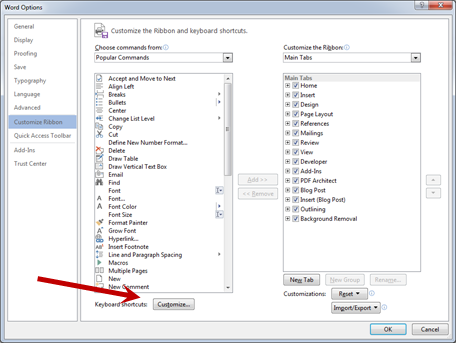
2. Choose Customize the Ribbon (shown above).

3. Choose Customize Keyboard ShortCuts

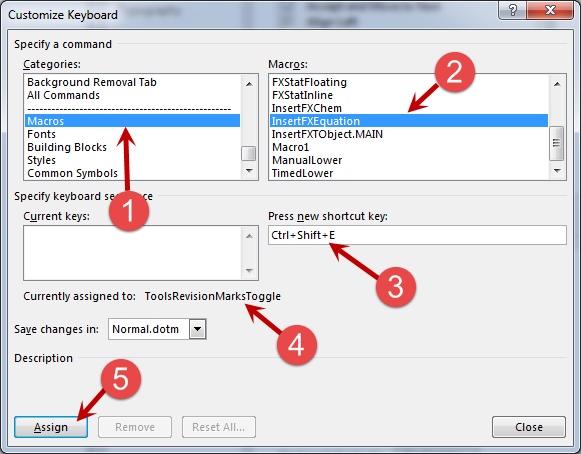
4. Select Macros (1) and then select InsertFXEquation (2). Click in (3) and press a key combination that you would like to use. I have chosen Ctrl+Shift+E. (4) tells you the command that that keyboard shortcut is currently attached to. I don’t use Revision Marks so I am happy using this. Finally, (5) assigns the keyboard shortcut.

Posted in Equation | Tagged | 1 Comment

New Merge File Feature

In response to a user need, we have implemented a “Merge File” feature. This is most useful if you are using FX Draw with Connections as it will allow you to merge images from two files.

The Merge Files option is available from the File Menu of FX Draw, FX Graph, FX Stat and FX ChemStruct.

We have also changed the icon that allows you to add a graphic to a file. It was red + on a green parabola, which made sense for FX Graph but was less intuitive for the other products. The new icon is

which is simpler and probably more intuitive.

Posted in Uncategorized | Tagged , | Leave a comment

Empower Program


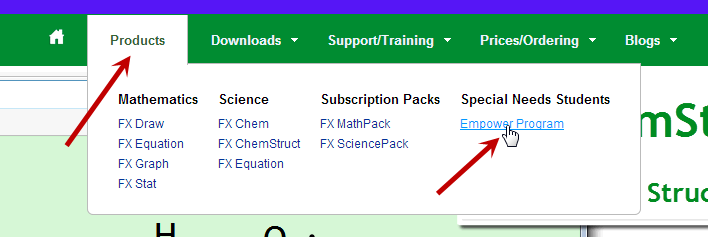
With our new website, a few people have “lost” the EmPower program. For those of you new to Efofex, our EmPower program offers free licences to students with special needs.

The good news is that EmPower still exists, it has just moved into the Products menu rather than having its own entry on the menu bar.

Posted in Uncategorized | Tagged , | Leave a comment

Can I Get The Scale On My x Axis to Show Degrees?

Question:
Can I Get The Scale On My x Axis to Show Degrees?

Answer:

Yes you can.

In the CURRENT (as at May 1, 2014) versions of our products you need to do this…

1. Select Degrees as the Angle Measurement (see below)

2. Press the Trig Graph button (see below). This turns on “trigonometric graphing” and FX Graph/Draw will look for “angle cues”.
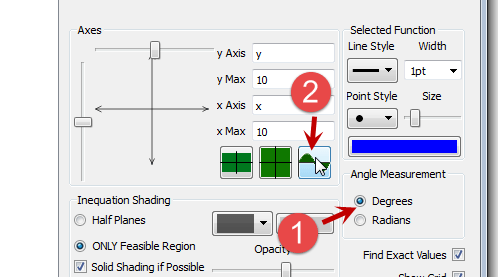
2. Now set up you x maximum so that it has an “angle cue”. This is a value like 360 degrees or 720 degrees.

FX Graph/Draw will detect maxima such as 360 as angles and will add the degrees signs as shown above.

HOWEVER

After reviewing your question, we have decided that in the current versions of the software, this has become too hard (it was actually a bit easier in FX Draw 3 and FX Graph 3). We know why this has happened – sometimes the automatic detection of angle cues was triggering unexpectedly (for example, someone might want a max of 90 outside of a trigonometric graph) – so WE made it harder to trigger.

Based on this decision, we have just implemented a new system. This will be available in the next release of FX Graph/Draw which will probably come out in the next week or so.

To trigger degrees signs in the new system, you just enter the x Max value as 360` (all Efofex products use the ` key to indicate degrees) and FX Graph/Draw will then:

1. Add degrees signs to the scale.
2. Automatically choose a scale that suits degrees (such as a tick mark every 30 degrees)

This seems more logical to us. It also means that you are no longer reliant on “angle cues”. You can now set x Maximum to anything and, by adding the ` you are forcing FX Graph/Draw to use degrees signs and suitable scales.

Thanks for your question. It will help make FX Graph/Draw better for everybody!

Posted in Draw, Graph | Tagged , | Leave a comment

Why Can’t I Get My Groups to Start at 150?

Question:

I am trying to get the histogram groups to start at 150 but FX Stat seems to be ignoring me. I am using the new “Groups Start At” option.

Continue reading

Posted in Draw, Stat | Tagged , | 1 Comment

New Video Tutorial

We have just uploaded a new video tutorial on using FX Equation with Word 2011 on the Mac. 

http://youtu.be/h4J3x6zGS6Y


Posted in Uncategorized | Leave a comment

New Blogs, New Website, New Sletter

Long time Efofex watchers will have noticed lots of changes over the last month or so.  We have released our new, upgraded website and, along with that, two new blogs.

The News Blog

The News Blog will become your main source of news about what is happening in Efofex.  Rather than waiting for weeks to collect together enough articles to write a newsletter, we will be putting articles up as they happen.  The newsletter will become a semi-regular “digest” of news stories.

You can follow our news blog (and our support blog) using Facebook, Twitter or your WordPress account – or just wait for your newsletter.

The Support Blog

Users often ask us questions about our software and we try to provide comprehensive answers.  The support blog will contain some of the more interesting questions and answers.  Following the support blog will provide you with hints and tips about all sorts of issues.  You will undoubtedly learn new things for the simple reason that we do!  Often, a user’s question will prompt us to think of new ways to use tools.

The last four news articles and support questions will always appear on our home page.  Take a look!

Posted in Uncategorized | Leave a comment