A New Activity To Download

We have recently recommenced work on our FX Library materials (which are designed to showcase the capabilities of our new MultiDocs technology) and started work on an interesting activity which we have decided to share early. As we were working on the activity, it proved to NOT be particularly suited to parametization but did develop in unexpected and interesting ways.

Semicircle Areas (Word document)

The activity is an interesting extension question for geometric series where students are asked to use their knowledge in an unusual way. If you are looking for an investigative activity for your higher-level students, this might be perfect!

As with all of our FX Library, the materials are provided with VERY generous copyright conditions. If you are using the activity in a school situation, you basically have free reign. Download away!

Posted in Uncategorized | Leave a comment

Using Parameters in Statistical Graphs

We recently included a new (and much simpler) way of using data parameters to draw statistical graphs. You can now use parameters in statistical graphs using formulas.

For example, if you create a data parameter using randnormal…

$p = randnormal(50,10,25)

This will create a data parameter containing 25 values which come from a normally distributed population with a mean of 50 and a standard deviation of 10.

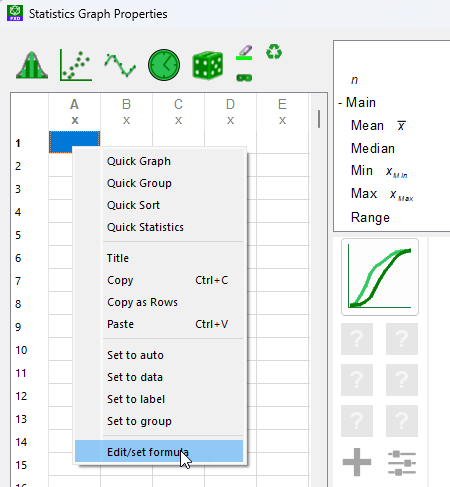
We can use this data parameter in a statistical graph by going to a cell in a column and right-clicking – then choosing Edit/Set Formula

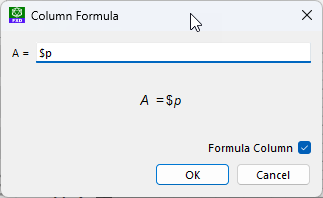
The formula window will appear and we enter $p

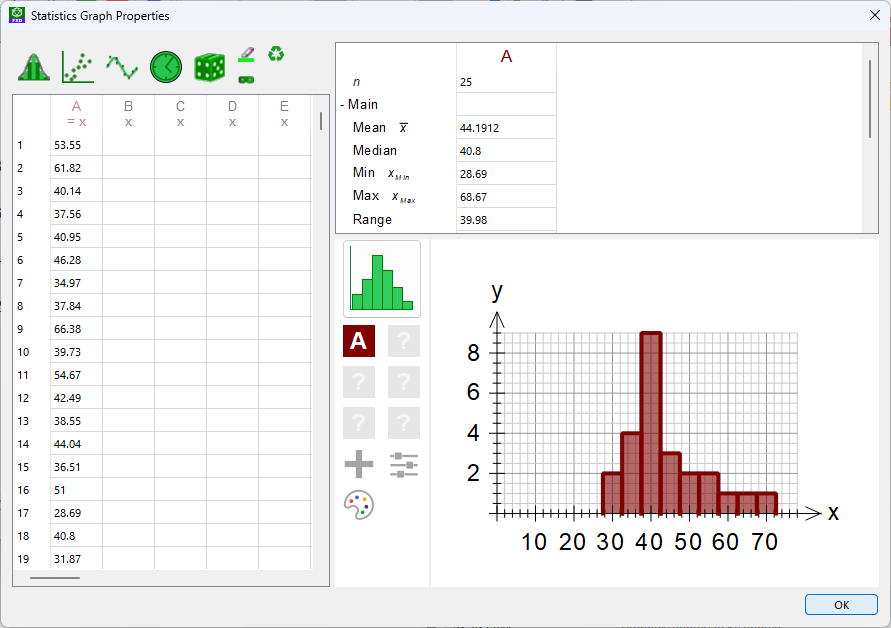
The data in $p will fill column A and can then be used to draw a graph. The data will be updated every time we regenerate.

Posted in Uncategorized | Leave a comment

New MultiDocs Training Videos

The release of MultiDocs has created a lot of excitement and many schools want to start using the new system to its fullest. This week we released a collection of new videos that can be used to get you and your staff up to speed on the new systems.

The full set of videos are a comprehensive look at the new features and are likely to go further than you initially need. We recommend that you start at the beginning and work your way through them at a pace that suits you.

To begin with, take a look at our Introduction to MultiDocs video. This gives you a quick overview of what it can do and how to get started.

Once you have the basic idea, we recommend that you look at basic parameters and the inline calculator.

Once you have mastered the basic processes, there are other videos available on Multiple Choice questions, statistical data, more advanced parameters as well as how to move a school to the new system. Visit the MultiDocs video training page for more details.

Posted in Uncategorized | Leave a comment

FX Draw Tools – MultiDocs Edition

We have released a new build of FX Draw Tools, specifically for anyone using the MultiDocs toolset.

The main change is that we have added a new Efofex MultiDocs app. This is a one-click way of starting both FX Draw and FX Equation, ready for use in a MultiDoc. Not only is this faster than the old, manual startup process, it also allows us to setup Word, FX Draw and FX Equation specifically for use in MultiDocs. This eliminates most issues users were having making the change.

You can still use the MultiDocs Edition to edit Classic Mode graphics and equations. This is not a one-way change.

If you are a Mac user, you will only have the choice of the MultiDocs edition. There are few changes that will affect you regardless of how you use it. If you want to use MultiDocs, run the Efofex MultiDocs app. If you are not using Microsoft Word and, hence, MultiDocs, you can still start FX Draw and FX Equation from your App Launcher.

If you are a Windows user, you can choose to download the Classic Mode Edition which operates as it always has. If you wish to use MultiDocs on Word (which we STRONGLY recommend) download the new MultiDocs Edition.

Moving From Classic Mode to MultiDocs

Just a reminder, MultiDocs includes a tool to help you move Classic Mode documents over to the new system. Moving to MultiDocs has no downside.

Posted in Uncategorized | Leave a comment

New MultiDocs Training Videos

WIth the release of our new MultiDocs Edition of FX Draw Tools, we are also publishing a number of MultiDocs training videos. These provide the equivalent of a face-to-face training session in video form.

So far we have released two videos:

Introduction to MultiDocs (18 minutes) – This provides a quick introduction to the concepts and processes behind MultiDocs. It is an ideal introduction to use with all of your teachers.

Moving Your School To MultiDocs From Classic Mode (13 minutes). This video helps you work out a manageable action plan to move your existing Classic Mode documents over to the new MultiDocs systems.

More videos coming soon!

Posted in Uncategorized | Leave a comment

PrimeFactors and PrimeFactorString Commands

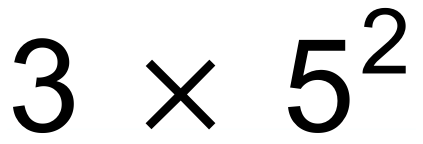
The inline calculator has two new commands that calculator prime factors. The primefactors command returns a list of NUMBERS which you can access individually. The primefactorstring command creates a string that you can output directly.

{primefactorstring(75)} will produce…

whereas primefactors(75) will give you access to the individual prime factors which can be used in further calculations.

The full description of the commands can be found here:

PrimeFactorString Command
PrimeFactors Command

Posted in Uncategorized | Leave a comment

New Equation Table/Grid Commands

We have added table and grid commands to the our equation tool. These can be used in FX Equation and FX Draw’s equation tool.

The table and grid commands operate in identical ways – the only difference is tables have lines and grids do not.

table(…) vrs grid(…)

Tables and grids can be nested within each other which creates a huge amount of flexibility in your layouts.

The table and grid commands are NOT intended to replace the full power of Word’s table editor but DO provide you with a lot of flexibility in how you format your output.

The full description of how to use tables and grids is available in our knowledge base.

Equation Table Command

Posted in Uncategorized | Leave a comment

New Tally Command

FX Equation (and the equation tool in FX Draw) have a new Tally command that can be used to create graphics like this.

Produced with the command tally(17)

The command can be used in any equation and can be combined with parameters and/or tables to produce complicated output such as:

You can also use a second parameter with the tally command that limits how many groups are displayed on one line. For example the command tally(64,4) will produce this output.

Posted in Uncategorized | Leave a comment

Newer, Faster Versions

We have been busy over the last few months, updating our products to run on the latest computers.

New 64 Bit Windows Versions.

We delayed moving to 64 bit versions of our products for many years as we waited for school technology to catch up. 64 bit computers are now just about universal so we have finally made the move. The new versions are faster and have fewer limitations that were forced on us by the old systems. For example, FX Draw now offers a 31cm by 43cm (slightly over A3) size drawing canvas whereas old 32 bit versions just managed a 30cm by 30cm canvas.

New Apple Silicon Versions

Our new Mac versions support both Intel chips and the new Apple M1/M2 chips natively. Anyone with a newer Mac will notice significant speed improvements with the newer versions.

The new versions, along with the many improvements we have made recently, mean that now is a good time to make sure that you are using the latest versions of our products.

Posted in Uncategorized | Leave a comment

New DivideInto Parameter Type

The DivideInto parameter randomly divides a number into bits.

For example,

$d=divideinto(100,3)

$d will contain 3 random numbers that always add up to 100. So $d might contain {23,56,21} or {14,38,48}

Posted in Uncategorized | Leave a comment