All New Information Videos

We have just released all new information videos. Every video has been updated to reflect the new cloud features.

The new videos can be found at Efofex Videos

The videos are divided into three categories, including six important, new videos that show you how to use our products.

hdfjddhogbbdellb

The Overviews section lets you take a quick look at the capabilities of each of our six products and what they are designed to do. Take a look at these videos first.

The new, Using The Output section provides six new videos which show you how to include output from our products in your documents and presentations. They provide clear, concise instructions in the many ways our products can be used on both Windows and Mac machines.

ilfaoklcdmhddbkk

Using the Output Videos

Finally, the How-To section provides specific instructions on how to use various features of the products. We expect this section to expand rapidly over the next few months.

Take a look at the new videos (Efofex Videos) to make sure that you are using our products in the most productive way possible.

Posted in Uncategorized | Leave a comment

Connectivity Issues Resolved

If you have been having connectivity issues with the new cloud versions, it is worth downloading the latest versions and trying again.

Technically speaking, we found a fault with how our products were handling proxy servers which would prevent connectivity in some cases. This issue has now been resolved and our products should always honour the system proxy settings. This should rectify a large proportion of the connectivity problems that have been occurring in some schools.

Non-technically speaking, try again – we have probably fixed the problem. Even if you have worked around the connectivity issues affecting registration (using a manual registration block), the new versions are still worthwhile as they will allow our products to back up your graphics to the cloud, making them available in other contexts and on other computers.

Posted in Uncategorized | Leave a comment

Microsoft Word Equation Issue Resolved


Hopefully you have not been one of those affected by the bug in a version of Microsoft Word but if you have been, there is some good news. Microsoft has now released a patch which customers have reported fully fixes the issue.

The Microsoft discussion of the whole incident is here.

The Microsoft discussion is here.

https://answers.microsoft.com/en-us/msoffice/forum/msoffice_word-mso_win10/microsoft-equation-editor-30-equations-and/fc3359c4-01c8-4638-acf8-32ce03b690ed

And the link to the fix is here.

https://support.microsoft.com/en-gb/help/3085439/april-12-2017-update-for-word-2016-kb3085439

Posted in Uncategorized | Tagged , | Leave a comment

Discrete or Continuous? A Subtle Problem with Ogives.

We sometimes receive reports that FX Stat is “doing something wrong”. Often the problems are actually a symptom of a deeper issue – when is data discrete and when is it continuous?

Sometimes data is CLEARLY discrete in nature. Those cases are simple and we will not look at them.

Sometimes data is CLEARLY continuous and needs to be graphed appropriately. Again, this is easy.

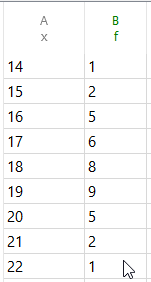
Sometimes things are not so clear. For example here is some data that is not clearly discrete or continuous. Unfortunately, it is almost identical to the first data set! Certainly the histogram will be the same.

Is this data discrete? Should we graph it using a dot plot? Or is it “sort” of continuous so a histogram is fine?

Often the answer to these questions depends on the context of the data, but our products (obviously) have problems with context. On the whole, we do not get involved. If you decide to graph it as a dot plot or a histogram, our products will do as they are told.

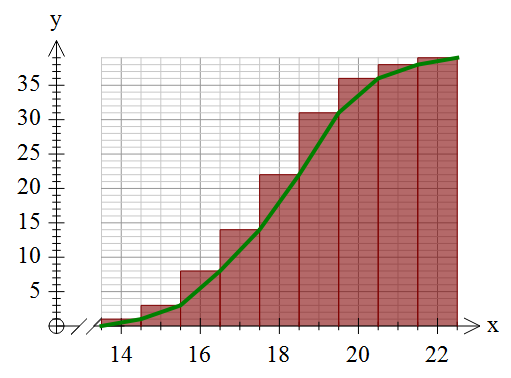
The real problem comes with ogives. If you are thinking of this data as “discrete”, the ogive should look like this (we have put in the histogram so you can see what we mean.)

Many of you are probably saying “but that is wrong – it should look like the first graph”.

Well … it depends.

If you are intending the data to be discrete, then this ogive makes perfect sense – by the time you get to 16 (as opposed to 16.5), your cumulative frequency is 8. If you are thinking of this data as continuous then you need the first graph.

Unfortunately, we cannot tell what you are thinking or, sometimes more importantly, which school system you are teaching in. Different school systems have different “standards”.

We have taken the decision to make our products treat the data as entered. If you enter discrete values with a frequency we will always draw the second, offset ogive. If you really mean your data to be continuous and want to draw the ogive, you will need to enter your data as groups.


Posted in Uncategorized | Tagged , | 2 Comments

New Look Website

We are very happy to announce the release of our new-look website. Fresh, modern and much friendlier on mobile devices.

The new website also links to our new Knowledge Base which is where we are now consolidating all of the various information sources that you can use with your subscription.

Take a look at the new site today!

Posted in Uncategorized | Tagged , | Leave a comment

OneNote and FX Draw, A Perfect Match


We have recently been working with OneNote and FX Draw on a Microsoft Surface Pro 4 and what we have found is a combination of tools that has the potential to revolutionise the way you teach.

For years, teachers have used technology to centralise their teaching materials. When I first started teaching, most experienced mathematics teachers had multiple lever arch files above their desk that contained all of the materials they needed to teach their courses. Now most teachers collect electronic materials into folders on their computers. OneNote represents the next level of organisation as it allows you to organise disparate collections of materials into one “notebook”.

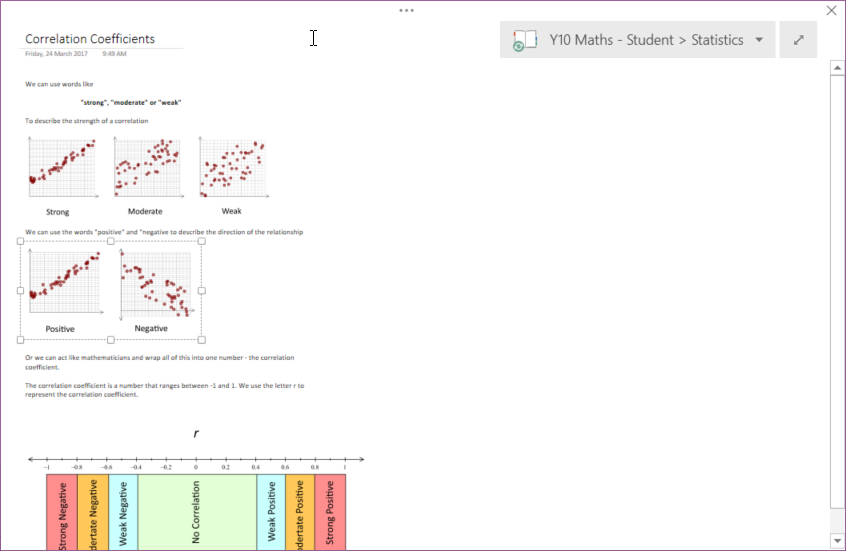
This screenshot shows one page of a OneNote notebook I am currently using to teach a pre-calculus level course. You can see the tabs across the top (1) for the topics and the pages (2) in the current topic. Also note where I have used the Surface’s pen to annotate the notes that I prepared earlier.

You can also use OneNote in full screen mode which makes it ideal for data projectors.

A major advantage of OneNote is that you can share your notebook with students in numerous ways. They can go home, visit a web page and see exactly the same thing that they were looking at in class.

The new FX Draw Cloud version allows you to dynamically create and insert editable diagrams into OneNote. It provides a dynamic mathematical drawing environment that will make you more productive and, with OneNote, far more organised.

While the ability to use a pen makes the Microsoft Surface (and similar tablet based computers) an ideal teaching tool, you can also use OneNote with FX Draw on any Mac or Windows computer. Obviously, you can also use FX Draw Cloud to produce graphics that can be used in ANY publication medium including Word, PowerPoint, Pages, Google Docs and Moodle (to name a few).

Posted in Uncategorized | Tagged , | Leave a comment

More FX Equation Information


It appears that we have had two FX Equation issues operating coincidentally, which makes life much harder for everyone. We have now isolated the two issues and can explain them in full.

The Dodgy Microsoft Update

As noted in the previous blog entry, Microsoft have released an update to Word 2016 that causes FX Equation equations, MathType equations and Microsoft’s own equation editor equations to not align with the text and can possibly have the top of the graphic chopped off. The affected version is 16.0.4498.1000. This issue is totally outside of our control and is currently being worked on by Microsoft.

We have had some reports that removing the update fixes the problem. The update causing the issue is the KB3178674 Security Update. There are three potential problems with this:

a) The update was created to address an undisclosed security issue in the software and removing the update could potentially put your computer at risk.
b) You will need to turn off automatic updates for Office otherwise the update will be automatically reapplied. You will also need to turn automatic updating back on in the future.
c) Uninstalling updates is not simple and will almost certainly require the attention of your IT services.

As this issue is totally outside of our control, we are not making any recommendations as to what should be done.

The Timing Issue

On some computers, when inserting an FX Equation object into Word, FX Equation is not returning the graphic to Word. Instead it is returning a large square. This can either happen intermittently or just about all the time.

This issue seems to be caused by a timing issue between FX Equation and Word. Word is asking for a graphic but not waiting for the graphic to be provided. We have not been able to recreate the issue here but have inserted a very short delay into the process (250ms to be precise) which seems to have fixed the issue for all users who have tested the fix. The new version is available online now.

As far as we can tell the two issues are unrelated but their coincidence has been very frustrating for everybody involved. Hopefully this is the end of the problems.

Posted in Uncategorized | Tagged | Leave a comment

Problem With Word 2016 and Equations


We have recently been receiving reports about FX Equations equations not lining up in Word 2016. Initially we thought that we were causing the issue but Microsoft has just announced that the issue lies with a particular version of Word 2016 (16.0.4498.1000).

The full discussion can be read here:

https://answers.microsoft.com/en-us/msoffice/forum/msoffice_word-mso_win10/microsoft-equation-editor-30-equations-and/fc3359c4-01c8-4638-acf8-32ce03b690ed

This discussion is referring specifically to MathType and Equation Editor but our products utilise the same features and are being similarly affected.

At this point in time there does not seem to be a resolution available to the issue but it seems that Microsoft is definitely aware of the problem and working on a solution.

Posted in Uncategorized | Tagged | 1 Comment

Efofex Graphics vrs Efofex Equations

Efofex produces two types of products – graphics products (FX Draw, FX Graph, FX Stat and FX ChemStruct) and equation products (FX Equation and FX Chem). You use graphics and equations in quite different ways, so using our graphics products and equation products is quite different as well.

The biggest difference between and equation and a graphic is that an equation is really “fancy” text that needs to be treated as text. The most important difference is that equations need to be lined up with existing text.

Using Efofex graphics is very similar regardless of where you are trying to place them. Using Efofex equations varies greatly depending on where they end up. This is because what we can do with your equations greatly depends on the capabilities of the target.

Using FX Equation and FX Chem

When FX Equation was first written, the only target we supported was Word for Windows and FX Equation works very efficiently in this context. The introduction of Efofex Cloud versions of FX Equation and FX Chem do not change this. If you are using FX Equation in this context, just keep on doing what you have always done.

Using FX Equation and FX Chem in other contexts requires a change of mind-set because the products now have two quite different “modes”.

Traditional
Inserting FX Equation equations into a Word for Windows document. FX Equation is responsible for everything, including editing old equations. You insert an FX Equation using a toolbar button that is added to Word. You double-click an existing equation to edit it in FX Equation.

Equation Generator
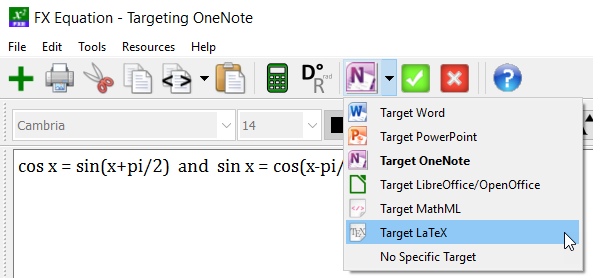
This uses FX Equation’s highly efficient equation engine to generate an equation that can be pasted into another product as a native equation. For example, this means that you can paste an equation into OneNote on a Mac in such a way that OneNote thinks that you have used its own, inefficient equation editor. This is a one-way process. FX Equation generates the equation but you then use the native OneNote equation editor to make any required small edits.

You use FX Equation as an equation generator, you need to start FX Equation as a standalone program and tell FX Equation which output to “Target”.

There are lots of different outputs available and we will be adding more. We are currently working on the ability to output equations in a format that can be used in Google Docs (which is not that good at equations).

Equations and Efofex Cloud
Efofex cloud adds lots of functionality to our graphics programs and most demonstrations we have produced focuses on the new possibilities. Efofex cloud does not greatly increase the power of our equation programs but this does not mean that they are not extremely versatile! If you have only used FX Equation in its traditional usage mode, you are missing out on all of its power and speed.

Speed
This brings us to the final part of this article. FX Equation and FX Chem are all about speed and using them as equation generators lets you leverage that speed in many more contexts. If you have only ever thought about FX Equation as a little tool for Word for Windows, you are really missing out on a lot of its power!


Posted in Uncategorized | Leave a comment

The New Registration System

Our new cloud products also have a new registration system. For the vast bulk of users, the new system is working perfectly but a small number have hit some issues. This article is to discuss those problems. If you have had no issues, you can move on!

We did not want to bombard all of our customers with a new code (that would almost certainly be ignored), so we designed the new system to automatically download new details (including your passcode) if your computer was already registered using an old unlock code. This has generally worked very well. If it has failed for you, it is due to a couple of possibilities.

1. The system has not had time to work before you have checked the registration. This seems to be a little bit of a problem on some school networks which can be a little bit slow. The system DOES work eventually but, by then, users have decided that they are unregistered. We recommend that you start one of the products and let it sit for a minute or so. Then close and restart the same product. If the Help/Manage Account is still reporting that you are unregistered, move to step two.

2. Some school networks are blocking all Internet traffic for our products. This will prevent the registration system from working. We recommend that you open one of the products and keep an eye on the status bar at the bottom of the window. Periodically it should report that it is syncing to the cloud. If the product is having connectivity problems it will report that it has no connection on the status bar. If you have no connection, you need to negotiate with your tech team to allow our products to talk to the Internet AND also send us an email. We can send you a manual registration email that will allow you to use the products until the connectivity issue is sorted out.

3. Finally, some users are installing the new versions onto a new computer that has never been registered. If this is the case, send us an email and we will get your passcode to you as soon as possible.

As users renew their subscriptions, everyone will eventually receive their passcode as a matter of course. If, like most users, your computer has automatically registered itself you can see your passcode right now. Just go to Manage Account in the Help menu. Your passcode is worth recording because it will never change. You can use the same code indefinitely to license any computers you need.

Posted in Uncategorized | Leave a comment