Efofex Cloud Beta – Please Help

Efofex Cloud Beta Available!

We are very excited to announce the public availability of the Efofex Cloud Beta – and we need your help.

Before we get to that, we had better explain what Efofex Cloud is. Take a look at this short video.

Efofex Cloud does a number of things:

  • It makes Efofex graphics available in FAR more contexts. You can (for example) easily create, use and edit graphics in a Google Docs document. In fact you can now use Efofex graphics just about anywhere!
  • It is completely cross platform. Our old systems relied on an old Windows technology (OLE) to work their best. This has never been available on the Mac so Mac users were second class citizens. Efofex Cloud fixes that.
  • All of your graphics are backed up in the cloud. All you need is your account login and all of your graphics can be quickly moved to a new computer.
  • You can share with anyone.
  • It moves support for graphics into the cloud, where we can do more with them. We are currently looking at web-based access so you could use Efofex on just about any device, not just Windows and Mac computers.

The basic process of using Efofex Cloud is simple. Take a look at this quick video showing the Basic Process to use FX Draw with Google Docs.

At this point you might have a few questions. So here are some answers for you.

So Will I Have To Learn Lots Of New Stuff?

No. Efofex Cloud is made up of the same six products that operate in almost exactly the same way as previously. The only real change is how you place graphics into documents and how you edit them later. This is shown in the Basic Process video. Most of the time you will feel totally at home.

I Just Use Efofex With Word On A Windows Machine. Do I Have To Change?

No. You can keep doing exactly what you are doing now. The new Efofex Cloud versions WILL silently upgrade your images as you create them to the new system so you can change over extremely easily in the future if you wish. This process is totally “invisible”.

Does My Machine Need Internet Access to Use Efofex Cloud?

Yes and no. The system will operate without access to the internet but nothing will be backed up and you will not be able to edit anyone else’s graphics. To use the full power of Efofex Cloud, you need Internet access.

We Need Your Help!

We have been exhaustively testing the new systems for the last six months but we now need more people testing it so we are asking for your help. If you are an FX MathPack or FX SciencePack subscriber, you can download the new versions from here.

FX MathPack Cloud Beta (Windows)
FX MathPack Cloud Beta (Mac)
FX SciencePack Cloud Beta (Windows)
FX SciencePack Cloud Beta (Mac)

These are beta software packages. Any graphics that you create or edit whilst using the betas will not be able to be opened in older versions. What we would like you to do is to try out the new products and report back anything you find (send information to info@efofex.com).

If you decide that you are happy to try the betas, send us an email (info@efofex.com) and we will keep you informed of any changes we make.

Other Changes

There are two other changes in these new versions that are significant.

  • We have created a new registration system that automatically polls our registration server and detects any changes in your subscription status. This will end having to enter a new unlock code whenever you extend your subscription. Basically, do it once and forget about it.
  • We have moved all of our Help systems to the web. This makes it much easier to keep everything up to date which means that you will have access to timely information. We can also embed videos directly into the Help system which will make explaining some things much easier. You can look at the new help system at:

Efofex Help

Full Release

We are expecting full release of the new versions in February 2017

Please try the new versions! Your input can make a difference.

Posted in Uncategorized | 2 Comments

Efofex Cloud – February 2017

In February 2017, Efofex will be releasing new cloud-enabled versions of our popular mathematics products. They allow you to create, use and edit Efofex graphics just about anywhere. Stay tuned for more details.

Posted in Uncategorized | Tagged , | Leave a comment

Our Products Reporting That Windows Files Are Missing

This post has been moved to our documentation web site.

Our Products Reporting That Windows Files Are Missing


Posted in Uncategorized | Tagged , | Leave a comment

Code Not Sticking? Try a Fresh Download

Question:

I am entering my FX MathPack code but the product is not recognising it. What should I do?

Answer:

About a year ago we had to make a small change to our registration code system. The codes look the same but the old system had a small flaw that was preventing us from generating expiry dates past 2018 – so a change had to be made.

Some older versions can cope with the new codes (we had anticipated the change a year earlier and started building in the capability) but many schools are still using old versions that predate the change.

So… If you are entering your new FX MathPack code but it is being rejected (or seemingly forgotten) by the products, try downloading fresh versions. It will almost certainly fix the problem AND you will be getting all of the latest features, fixes and improvements.

Posted in Uncategorized | Tagged , | Leave a comment

Sinusoidal Regression and Data Generation


We have added a new sinusoidal data generator and regression calculation to FX Stat and FX Draw. They have been included in the latest uploads.

Data Generator

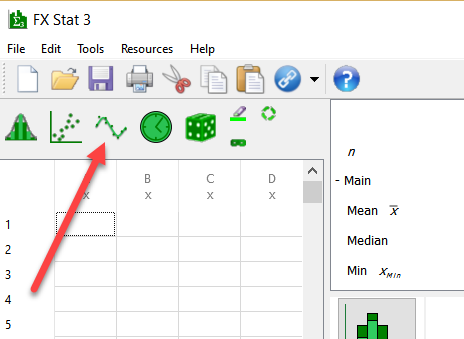
The new data generator is available from the data generator toolbar.

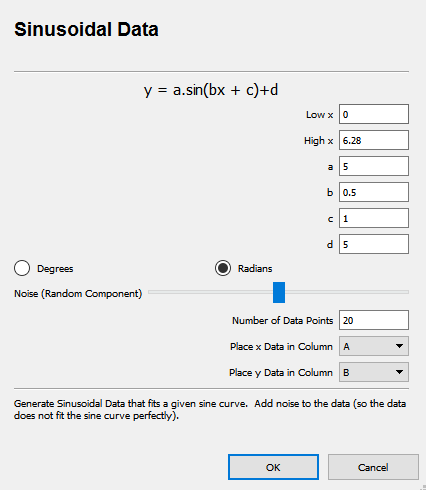
Simply enter the parameters you wish FX Stat/FX Draw to use for the sine curve, select an amount of “noise” to add to the data and push OK.

A bivariate data set is produced that can be graphed on a scattergraph.

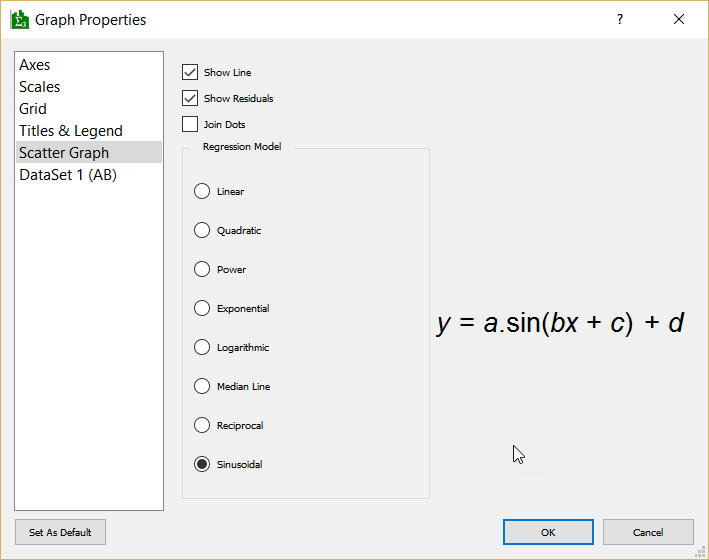
At the moment, FX Stat is trying to fit a linear regression equation to the data (not very successfully!) By right clicking on the graph, we can change the regression equation in use.

By selecting Sinusoidal Regression, FX Stat will fit a sine curve to the data.

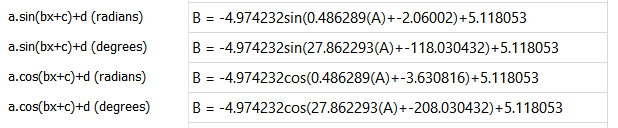
The summary statistics pane will offer you a number of versions of the curve’s equation.

All of these equations are equivalent.

Please note that the calculation of sinusoidal regression equations is not as simple as other regression equations and there are always a number of possible solutions. FX Stat/FX Draw will produce an equation with the longest possible cycle-length (you could, for example, produce a sine curve with a far shorter period than the one shown above that actually “fits” the data better) and the results are similar to those produced using other tools like graphics calculators. There are some cases however, particularly if you have multiple cycles worth of data, where FX Stat/FX Draw may find a solution you were not expecting.

Posted in Uncategorized | Tagged , | Leave a comment

New Circle Points Feature


The same user that suggested the conic section tools also suggested this new feature.

FX Draw 6.003.2 also includes a new feature which adds point to circles.

Draw a circle and select it. When you right click on the circle you will be offered a new suggestion to add dividing points.

Tell FX Draw how many points to add.

FX Draw will add the points to the circle.

Posted in Uncategorized | Tagged , | Leave a comment

New Conic Sections Tools for FX Draw


These new features were inspired by a user suggestion (thanks MS).

We have uploaded a new FX Draw (V6.003.2) that includes three new conic sections tools.

These allow you to quickly and easily draw conic sections using the locus model.

We have also updated the three ellipse tools so that they can mark their own vertices, axes, foci and directrices.

Posted in Uncategorized | Tagged , | Leave a comment

New Line Division Feature for FX Draw


We have added a new feature to FX Draw. The new feature has been included in the 6.002.0 release.

You can now divide any line by adding dividing points to the line.

First select the line, then right click on it and choose Add Dividing Points…

Now enter how many parts you wish to divide the line into. You can also choose to add points to the ends of the line.

The points are attached to the line and will move with it.

You can also delete the line and the equally spaced points will remain on the canvas.

Posted in Uncategorized | Tagged , | Leave a comment

New Mac Versions


We have uploaded new Mac versions of our products. These new versions address two issues.

1. Recently we have received reports that the Connect To Word feature was not operating correctly. It transpired that Microsoft has recently modified how Word responds to one of our requests and this was confusing the Connection system. Our new versions work around this change.

2. We are now Apple Identified Developers which will make the GateKeeper application on your Mac much happier. All products are now signed with our developer certificate.

We have had to temporarily remove the FX MathPack and FX SciencePack downloads as the digital signatures are not surviving the packaging process. In the short term, all this means is that you will need to download the constituent products separately. In other words, if you are an FX MathPack subscriber, you just need to download the four products: FX Draw, FX Equation, FX Graph and FX Stat rather than getting all four products in one download.

Posted in Uncategorized | Tagged | Leave a comment

A Radical New Feature for FX Chem


This new feature was inspired by a user suggestion (thanks IK!)

We recently uploaded a new version of FX Chem (3.003.2) which introduces a radical new feature – literally.

Now, if you type a radical with a free electron, something like OH. (with the full stop) FX Chem will automatically convert the full stop to a raised dot.

Snippet

The new version can be downloaded now by holders of licenses for FX Chem 3 and any current FX SciencePack subscriber.

Posted in Uncategorized | Tagged , | Leave a comment