New Feature: Select Number of Decimal Places in Data Generators


This feature was suggest to us at a recent mathematics conference. If you have a good idea for how we can improve our products, you can always send it to us at info@efofex.com.

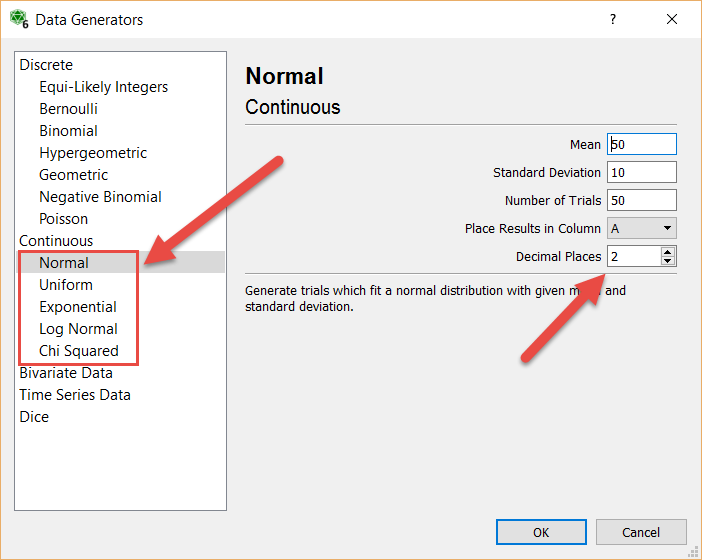
We have added the ability to select the number of decimal places generated with our continuous data generators.

If you are not using the data generators in FX Stat and the statistics tool of FX Draw, you really should be. They give you quick and simple access to a large number of distributions.

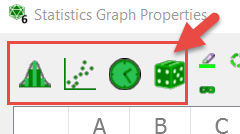
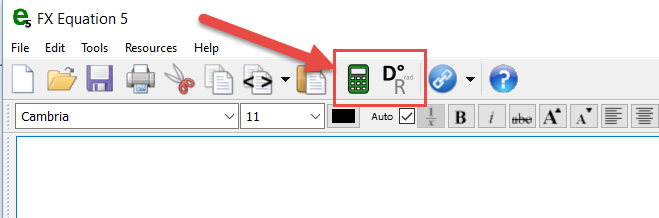
These four buttons give you access to the selection of generators.

There are fifteen generators in all including a very handy bivariate data generator that allows you to enter the regression formula you would like to fit and a target correlation coefficient. Once you have selected your parameters, the generator generates random values from the selected distribution.

A new decimal places option has been added to the continuous distributions. You can select anywhere from 8 down to -2 decimal places (-2 rounds to the nearest 100).

Posted in Uncategorized | Tagged , | Leave a comment

New Standard Line Types


Another Efofex Teacher Resource Project inspired feature.

FX Draw has always been able to draw things like network diagrams by appropriately setting up the “default” line type but the process was a bit fiddly and many of our users never realised that it was possible. Now we have added a number of pre-set standard lines that make this quicker and easier.

ddfcdhja

Go to the Line tools and select Choose a Standard Default Line Type. We will choose a network line that has an open circle at each end. This will set up the default line type and turn Use Defaults on. Now, all of the line tools will use this default, making drawing network diagrams trivial.

jhhbechh

Posted in Uncategorized | Tagged , | Leave a comment

New FX Equation Feature

The Efofex Teacher Resource Project has inspired a number of new features for our products. In FX Equation, we have added a new calculator button.

As we were typing solutions to problems we realised that we were repeatedly reaching for a scientific calculator to calculate simple expressions and were often just retyping what was displayed on the FX Equation screen.

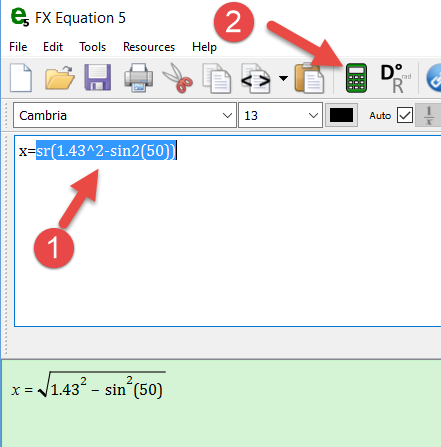
The new calculator button removes the need for the scientific calculator. Simply select the expression that you want to simplify and then press the calculator button.

If the currently selected expression is calculable, FX Equation will simplify the expression and place the value onto the clipboard. I can then type the next line, pasting in the calculated value.

The new calculator feature is just the beginning of our plans for new, time-saving features that will be added to FX Equation! The new feature is included in the latest release (5.008.1)

Posted in Uncategorized | Tagged , | Leave a comment

Major New Project From Efofex!


We usually spend the Christmas break hunkered down, using the quiet time to do something a bit different. This time we have come up with something very special and are proud to announce the

Efofex Teacher Resource Project

The Teacher Resource Project is simple in concept but provides a lot of value for both you and us. We are producing publication quality materials that you can use in your teaching but also showcase the things that our products, particularly FX Draw, can do. Everyone has access to the files in a non-editable PDF format. Registered users have access to the materials in editable Microsoft Word (docx) format that also includes fully worked solutions. (Note that you must be using the latest versions of our mathematics products to access the docx versions).

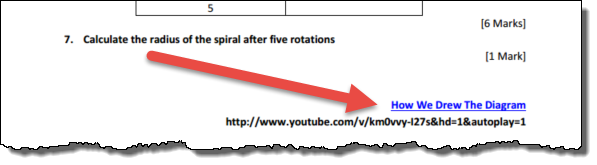
To give you an idea of what you can expect, here’s the beginning of an investigative task on the Spiral of Theodorus
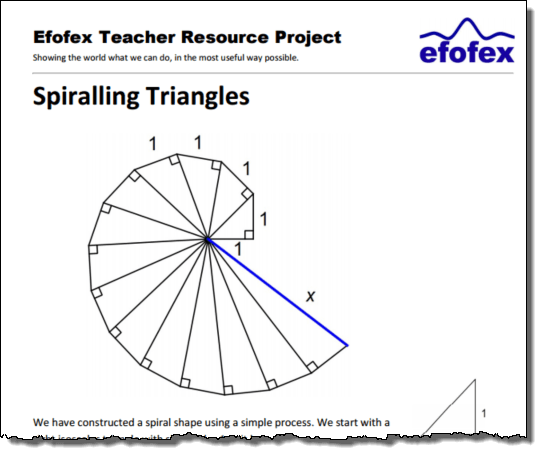
Perhaps the most exciting aspect of the Resource Project is that each document includes links to small videos that show you how we drew the diagrams. This means that you get the materials AND the knowledge on how to modify them or produce your own similar materials at the same time!

The Teacher Resource Project is an evolving thing. We will listen to what you want and try to produce materials that are relevant to your needs. At the moment there are six documents. We will be adding to this list regularly.

You can take a look at the Project web page straight away at http://efofex.com/etrp.php.

So what can you do with these materials?

If you are a teacher, just about anything you like.

You can copy them, modify them, put them into your school assessments. Whatever. The only thing we do not allow is for you to claim copyright over them or use them to make a profit. We have put together a full FAQ at http://efofex.com/acceptableuse.php.

A Hidden Benefit

There is also a hidden benefit of the Teacher Resource Project. As we use the products to produce the diagrams, we have found lots of little issues and annoyances, as well as having a number of really good ideas about improvements. In other words, the whole process has a positive impact on the quality of the products. We will be announcing lots of new features over the next few days that are the direct result of the Teacher Resource Project.

We are very excited about the Teacher Resource Project and look forward to providing you with great materials and training as it develops!

Posted in Uncategorized | Tagged , | Leave a comment

A Rash Of Upgrades


You might have noticed that there has been a rash of upgrades and updates coming from Efofex over the last three weeks. It has been an extremely busy time for us, mostly for reasons not of our making.

Unfortunately, the release of FX Draw 6 and FX Graph 6 happened to coincide with the releases of Windows 10, Office 2016 and OS X “El Capitan” which has created a storm of incompatibilities of epic proportions.

The problems started when WIndows 10 prevented us from using a particular location for our Word integration. That prompted a fairly major change in how we integrate into Word. Then we found that the combination of Office 2016 and El Capitan also proved problematic and forced more changes on how our products run. Then we discovered that to get the required changes to run on El Capitan, we needed to change the version of a major 3rd party component of our products. This created a slew of minor incompatibilities as varied as registration files being deleted and some degrees signs showing up as a Chinese character. It also means that we can no longer support OSX 10.6 (Snow Leopard) for future versions. Over the last three weeks we have logged over 100 changes to the products when we usually would log about 3.

The good news is that the storm seems to have passed.

1. Our products now run smoothly on Windows 10.
2. Word integration problems on Windows machines are largely solved but there still may be some residual issues for customers installing on machines that are not set to English.
3. Our products now work correctly on Office 2016 for Windows and Mac
4. Our products now run on OSX El Capitan and we have provided legacy copies for users of Snow Leopard.
5. We believe that we have completed the transition to the new version of the 3rd party component.

As this is being written, we have no outstanding issues with any products and you can freely install them on your machines.

Posted in Uncategorized | Tagged , | 2 Comments

Mac Users Please Note

Question:
We have spent the last week battling a number of changes that have been implemented by Apple (with their release of OS X El Capitan) and Microsoft (Word 2016). El Capitan seems to have broken a number of third party tools that we rely on and this has meant that we have had to rework all of our internal processes. There is also a lot of news reports around about incompatibilities between Word 2016 and El Capitan.

Efofex products have been mildly affected by a change in Word 2016 but we have worked around this and will be releasing new versions soon.

If you are using a Mac computer, we would recommend that you do NOT upgrade to El Capitan and Word 2016 for at least a month or so. We have no doubt that these problems will be sorted out quickly by Microsoft and Apple, but we would hate you to have as bad a week as we just had!

Posted in Uncategorized | Tagged | Leave a comment

Upgrading to FX Draw 6/FX Graph 6

Our normal policies apply with the new releases of FX Draw 6 and FX Graph 6.

1. Customers using our FX MathPack subscription system can upgrade immediately and the new versions will recognise and honour their subscriptions.
2. Customers who have purchased Perpetual Use licenses for FX Draw 5/ FX Graph 5 (and earlier) can choose to upgrade their copies. Visit our Prices and Ordering Calculator to obtain an upgrade price.
3. Customers who purchased a Perpetual Use License for FX Draw 5 or FX Graph 5 within the last six months will be provided with a free upgrade to the new version. We will be generating and sending these codes within the next week or so. In the short term, you can download and install the new version which will run for thirty days without the new code.

Posted in Uncategorized | Tagged , | Leave a comment

FX Draw 6 and FX Graph 6 Released!

We are very pleased to announce the full public release of FX Draw 6 and FX Graph 6. The new versions are available from our downloads page (http://www.efofex.com/Downloads.php).

We are now moving on to two exciting new initiatives that we will tell you about soon!

Posted in Uncategorized | Tagged , | Leave a comment

Using FX Equation On The Mac

We have been working for some time to address a confusing issue when using FX Equation on the Mac.

The issue expressed itself in the following way. The first time you used FX Equation to create an equation, pressing the green tick/check mark would return to Word and paste the equation into the document. The second and subsequent times you used FX Equation, pressing the green tick/check mark would just return to Word and nothing would be pasted. The equation was on the clipboard (and could be pasted manually) but the behaviour of the green tick/check mark was different which was confusing for users and frustrating for us.

The problem has been fixed – but not by us.

We always suspected that the problem was external to FX Equation but recent events have confirmed this. We recently updated our computers to the new “El Capitain” release of OSX. We also accepted another of Word 2011 for Mac’s critical updates. One or both of these updates has fixed the problem. Unfortunately we do not know which one (and would love your assistance in determining which one fixes the problem!)

If you have been battling this FX Equation issue, let Word update and see if that fixes the problem. If not, try updating to the new (free) OSX. The combination of the two should fix things up!

Posted in Uncategorized | Tagged | Leave a comment

Integrating With Microsoft Word in Windows for All Users (The “Wrinkle”)


In our last article we promised to discuss a wrinkle that involved Office 2010 but then didn’t send the article. We didn’t post the article because more information came to light and we were working to iron out the problems. Sorry for the delay but the wait was worth it!

If you are installing your OWN copies of our products on your OWN machine, the rest of this article will probably not concern you. If you use our products on a school computer or are installing our products for a number of users, read on.

We have worked for many years to allow schools to install the Word Integration (on Windows machines) for all users of the computer. This has been difficult as Microsoft want us to install the integration for all users separately. This has led to a constant battle – we would find a solution and then Microsoft would make a change that broke the solution. Recently, they made a change that broke our solution permanently. In response we have changed our approach entirely and largely given in to the pressure put on us by Microsoft. The result has been better than we had hoped for.

We have released new versions of all of our products (release date November 2 2015). These new versions will no longer offer you the option to install the Word integration for All Users of the computer. If you install Word integration from within the installer, it will only install for the current user. This is perfectly acceptable on a single user machine but will not work for multi-user machines.

The Big Change

The new versions have a new option in the Help menu.

Any user can now integrate the products into Microsoft Word for Windows (2007 and later) at any time. Just select the option and all currently installed products will be integrated. No need for a tech support visit as administrator rights are not required. The integration will appear the next time Word is started.

For the technically orientated, this command copies the macro template files into the user’s Roaming profile. This replaces our old system where the templates were stored in a deprecated (but the only available) all user startup location in Word’s directory structure.

Network managers installing for large numbers of users can manage this in two ways.

1. Direct any affected users to start one of the Efofex programs from the Start menu and choose the Integrate option from the Help menu to get their Word integration.
2. If you prefer to add integration automatically, you can use a new command line parameter.

eg. FXDraw6.exe /word

Running any of our products with a /word parameter will cause the product to run, perform the integrate step and then close silently. This allows the process to be scripted. You do NOT need to do this for each product as the command will include the integration for all currently installed products.

We recommend pointing the new command out to your users as it will allow them to fix most issues themselves.

Now, back to the ironing.

Posted in Uncategorized | Tagged | Leave a comment