FX Draw for the Mac

We presented a session focussing on FX Draw on the Mac and the MAWA conference on the weekend and it was the first time we have received considered feedback from teachers who have been USING FX Draw for the Mac.

Generally, the response was positive (actually it was more like “thankful” that we have finally got versions out for the Mac). A few small errors were pointed out and we have uploaded a new version today that addresses those issues.

What we have found is that there are a couple of wrinkles on the Mac that are not problems on Windows machines. We have had to institute a number of small workarounds that bypass these issues. Importantly, if you are using FX Draw on a Mac and find something that is misbehaving, PLEASE tell us. Often they are small things that can be fixed in a few minutes.

Posted in Uncategorized | Tagged , | Leave a comment

New Logic Symbols for FX Equation


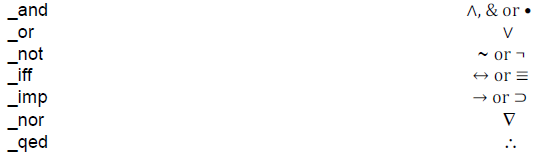
We have added the ability to create logic statements into FX Equation. FX Draw will include them in the next release.

All of the logic commands are preceded by _.

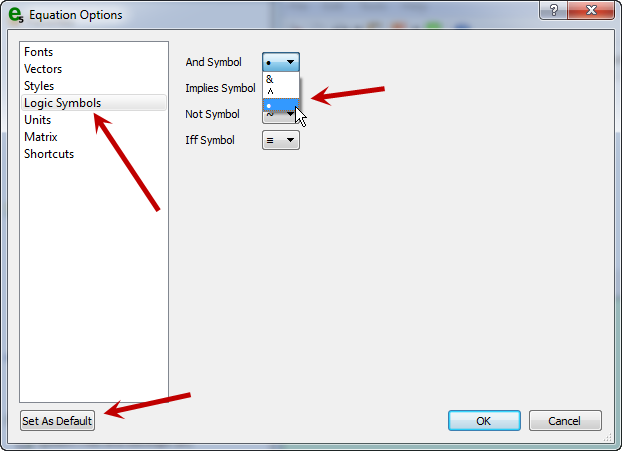
We have added another page to the equation options which allows you to select which symbol appears for each command. Select your desired symbols and don’t forget to push Set As Default.

Posted in Uncategorized | Tagged , | Leave a comment

Setting Initial Preferences in FX Draw and FX Equation

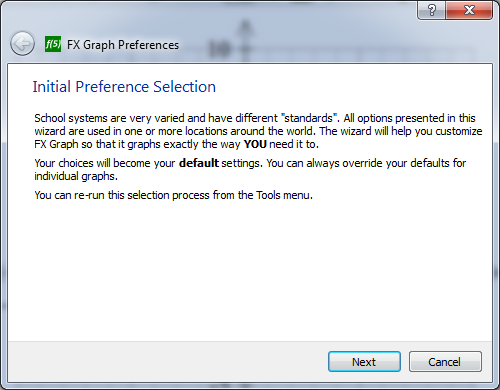
FX Draw and FX Equation have both been upgraded to offer you the same Initial Preferences Selection interview we recently added to FX Graph. The interviews allow you to quickly set up FX Draw and FX Equation to produce graphics that look exactly the way you want them to.

The new versions are available for download now.

Posted in Uncategorized | Tagged , | Leave a comment

New FX Graph Overview Video Available

We have uploaded a new video which gives a quick overview of the features in FX Graph 5. It’s a great way to quickly show new users the power available in FX Graph.

The video is available from the FX Graph product page

Posted in Uncategorized | Tagged , | Leave a comment

New Way to Set Up FX Graph


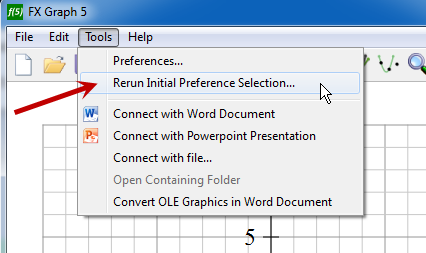
FX Graph is extremely flexible and can produce graphs that suit all of the various “standards” that exist around the world. One problem we have had is that users have not always found the right preferences to get what they want. In response to this, FX Graph (5.005.10 and later) will give you a short interview that allows you to set up the most important preferences.

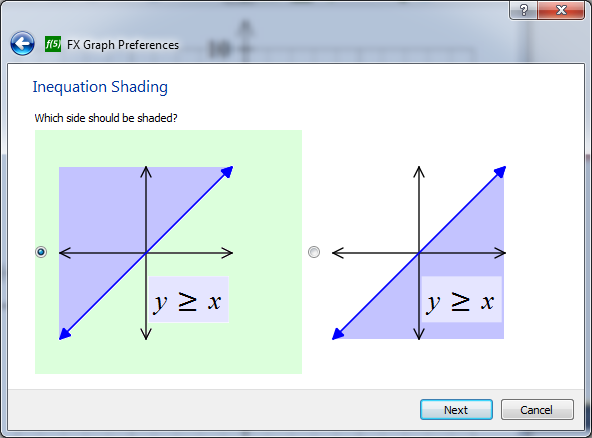
The first selection is probably the most important and potentially frustrating. There are definitely two schools of thought as to which one is “right”! FX Graph doesn’t care – it just needs to know which one you want.

The first version of the interview has eleven selections that take a minute or so to answer. The pay-off is that FX Graph will fit your needs that much better. The interview will run once, the first time you start FX Graph after installing the latest version. You can re-run it any time you like by choosing this option from the Tools menu.

We will be implementing similar interviews for our other products in the near future.

Posted in Uncategorized | Tagged , | Leave a comment

Upgraded Unit Circle Tool in FX Draw

Upgraded Unit Circle Tool
We have given the unit circle tool a major overhaul with a number of new features that make the tool much more useful for demonstrations and graphic production.

1. The unit circle tool can now interpret and show angles greater than 360 degrees.

2. The arc now has the option of an arrow head as shown above.

3. The unit circle can also show negative angles.

4. You can set the unit circle to larger angles and negative angles by using the unit circle’s keyboard short cuts (up arrow = +1 degree, down arrow = -1 degree, page up = +10 degrees and page down = -10 degrees). You can also explicitly set angles for the unit circle on the unit circle’s property page.

5. There are a number of usability improvements, particularly when controlling the angle line with the mouse.

The changes have been included into the latest upload of FX Draw 5. If you hold a perpetual licence for FX Draw 5 or if you are currently hold an FX MathPack subscription, you can download the new version (5.005.9) immediately.

Many thanks to J Moor for his suggestions!

Posted in Uncategorized | Tagged , | Leave a comment

Support Blog Reminder

We want to remind you of our new Support Blog. This is where we post answers to user questions that we believe will benefit other users. For example, the last entry was

Can I Attach FX Equation to a Keyboard Shortcut in Microsoft Word for Windows?

Our answer details how you can hook up a keyboard shortcut if you prefer to use FX Equation that way.

The Support Blog is quickly becoming a valuable source of useful information for teachers. Most users will pick up some tips and tricks that they had not known. Many will see features discussed that they never realised were there!

We strongly recommend that you join our Support Blog Monthly Digest which will automatically send you a monthly summary of the support blog articles we post.

Posted in Uncategorized | Leave a comment

PowerPoint Add-In (Windows)

We have released a new PowerPoint Add-In for PowerPoint 2010 and later.

The Add-in creates an Efofex tab in your PowerPoint ribbon. This tab provides an easy method to insert Efofex objects into your PowerPoint presentation.

The Add-in is available for download from our download page. Choose the Miscellaneous option.

The direct link to the file is FX PowerPoint Integration

Posted in Uncategorized | Leave a comment

“Macification” Process Now Complete – A New Direction

With the release of FX Chem and FX ChemStruct for the Mac platform, we can finally say that the process of “Macification” is complete! This has been an intense, three year process that has produced many benefits beyond the availability of our products on the Mac platform.

Most importantly, our code-base is now much more standardised and we can make changes to the products much faster. This will allow us to continue to develop our product line to provide high-productivity services to science and mathematics teachers. Now that we no longer have the overhang of work to move to the Mac, we can implement some of the exciting features we have planned.

Perhaps our most important new focus will be on usability. Our products are extremely versatile and contain many features that are simply not available anywhere else. Unfortunately, with that versatility comes complexity and time-poor teachers often just don’t find tools that can make their lives much easier. We are going to be working hard to remove (or at least hide) this complexity and make sure that teachers find the things they need.

As always, the best way to keep up with the changes will be to keep an eye on this news feed on FaceBook, Twitter, WordPress or by subscribing to our newsletter.

Posted in Uncategorized | Leave a comment

FX Chem 3 and FX ChemStruct 2 Release

FX Chem 3 and FX ChemStruct 2 are now publicly available for download for both Windows and Mac.

The two science products have experienced minimal changes as we have made the changes required for Mac compatibility. Upgrading to the new versions is only necessary if you wish to use the products on a Mac computer or if you wish to share materials with a user on a Mac machine.

Posted in Uncategorized | Leave a comment