$$ For Your Local Currency

The latest versions of our products will replace $$ with your local currency symbol as determined by your computer settings.

€, £, ¥ and even ₮

Even better, if you send your document to a user in a different country, your equation will be rendered using their currency symbol automatically.

Posted in Uncategorized | Leave a comment

Efofex Toolbars Return To PowerPoint

Our new MultiDocs system has allowed us to rebuild support for PowerPoint. The latest versions of our products can now insert toolbars into your copy of PowerPoint on both Windows AND Mac.

PowerPoint on Windows
PowerPoint on Mac

Even better, the new toolbars provide access to all of the MultiDoc features. You can create self-modifying mathematical PowerPoint presentations or just use our products more efficiently.

Adding the toolbars to PowerPoint is more complicated than Word. In the Help menu of any of our products, go to Manage Office Integration.

Extra Steps Required

This button will provide all of the details to get you started.

Posted in Uncategorized | Leave a comment

MultiDocs/Parameters Grow In Power

The last few months have seen continued frenetic development in our MultiDocs system. The ability to create self-modifying mathematical documents (think one test with multiple versions at the push of a button) is the most powerful and exciting development from Efofex since FX Draw.

In recent weeks we have added new classes of parameters that allow you to create data sets and perform calculations on the sets. You could create some random data; draw a graph; calculate some summary statistics and write a comprehensive statistics question. Once complete, you push a button and get a totally new version of your question.

We have also release a selection of new videos to help you get your head around the new ideas. The nice thing about MultiDocs is that you use them to create your own documents; you can use MultiDocs written by others (see our FX Library) or just ignore them completely and keep using our products as you always have.

Take a look at our MultiDocs introductory materials now.

MultiDocs – Powered by Efofex

Full details of the powerful new features are available in our more technical, Efofex Insiders blog.

Posted in Uncategorized | Leave a comment

The New IF Command

Basic Usage

The new If command in the inline calculator allows you to create extremely complicated expressions.

The If command has the following format

if(condition to be satisfied, value if true, value if false)

For example, an if statement might look like this

{if($n>0,100,-20)}

When this command is run, the inline calculator will look at the value of the $n parameter. If the value is greater than 0, this statement will be replaced by 100. If the value is less than or equal to 0, the statement will be replaced by -20.

If commands will often include multiple parameters.

{if($n>0,$p,$q)}

With this command the inline calculator will return the value of either $p or $q, depending on the value of $n.

Conditions

A condition is a Boolean statement that returns true or false. Conditions often include inequalities:

  • $s<4
  • $n>=6
  • $q=9
  • $t<>7 ($t is not equal to 7)

These are fairly simple conditions. You can combine these using the And, Or and Not commands as well as some of the more specialized Boolean commands to produce extremely complicated conditions.

Numbers Or Text?

You can use the inline calculator to insert numbers or text into your equation. If you want to insert text into your equation, you must wrap the text in quotes.

For example:

{if($d=0,”Cannot divide by zero”,$n/$d)}

This command will look at the value of $d. If the value is 0, the inline calculator will return the text Cannot divide by zero. If $d is not zero, the calculator will divide $n by $d and return the result.

Nested If Commands

If commands can be nested.

{if($n=0,”n is zero”,if($n<0,”n is negative”,”n is positive”))}

This command might take a little decoding…

If $n is zero, the command will return n is zero. If $n is not zero, the calculator will return the second result – which in this case is another if command. The calculator will execute the nested if command and return the appropriate response. There are no technical limits to the amount of nesting but the expressions can quickly become unwieldy. Often a better way to nest if commands is to assign commands to parameters. For example, if you assigned

$p=if($n<0,”n is negative”,”n is positive”)

You could then write the nested if command as

{if($n=0,”n is zero”,$p)}

Boolean Conditions

We have added a number of commands to help you write Boolean conditions. Details can be found in the online documentation.

  • And
  • Or
  • Xor
  • Nor
  • Not
  • IsEven
  • IsOdd
  • IsInteger
  • IsComposite
  • IsPrime
  • IsFactor
  • IsNatural
  • IsCube
  • IsSquare
Posted in Uncategorized | Leave a comment

Major New Parameters Command

The latest versions of FX Draw and FX Equation have added an IF command. This represents a major increase in the power of the parameters system and allows authors to create significantly more powerful MultiDocs.

An example If command might look like this…

{if($d=0,”Cannot divide by zero”,$n/$d)}

If you included this command in a question, the inline calculator will look:

  • Look at the value of the $d parameter
  • If $d is zero, the command will add the words “Cannot divide by zero” to your equation.
  • If $d is not zero, the command will divide the value of the $n parameter by $d and output the answer.

In addition to the new IF command, we have added a number of other Boolean commands that make it easy to write conditions for IF commands. These include:

  • And
  • Or
  • Xor
  • Nor
  • Not
  • IsEven
  • IsOdd
  • IsInteger
  • IsComposite
  • IsPrime
  • IsFactor
  • IsNatural
  • IsCube
  • IsSquare

The new IF command is available for use now but we anticipate that its power will allow us to add a variety of new features. Keep an eye out!

Posted in Uncategorized | Leave a comment

Creating Your First Parametized Question

Efofex Parameters have been available to users for a few months now. Some users are doing absolutely amazing things with them including one user who is creating documents that can provide both Greek and English versions of the same questions. We have been constantly adding new capabilities as we experiment with parameters. For example, we recently added a feature which will write the value of a parameter in English text (so it turns “31” into “thirty one”) so numbers can be included directly in the text of your questions.

Users have been using FX Library to see some of the things that are possible but we have started to hear people ask “This all looks great, how do I start?” To address this, we have published a new video where we look at turning an existing test question, written in Word, into a fully parametized question.

If you are interested in creating at MultiDocs, take a look at the new video!

Creating Your First Parametized Question

Posted in Uncategorized | Leave a comment

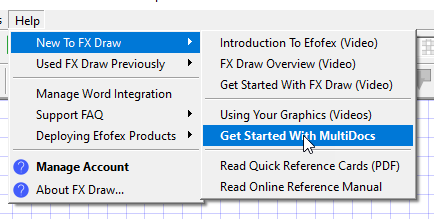
New Help System

We have recently improved access to our Help resources by restructuring the Help menu in our products. We have provided a little more information but, more importantly, have made the existing information much more accessible. Take a look after your next update.

Posted in Uncategorized | Leave a comment

Expanded Calculator Capabilities for Efofex Parameters

The built-in calculator provides a large proportion of the capabilities of Efofex Parameters. The ability to type:

{3 sin 20}

and have the expression automatically calculated is crucial to most parametized questions.

Recently we improved the capabilities of the built-in calculator in two major ways.

Improved Exact Value Calculations

The calculator can now produce exact values for expressions like {$x^5} if $x is already an exact value like 2/3.

Combinations and Permutations

The calculator can now calculate expressions involving combinations and permutations like {5C2} and {7P3}

Posted in Uncategorized | Leave a comment

New Sequence Command for Efofex Parameters

If you are using Efofex Parameters, you are almost certainly using the range command.

$y=range(1, 20, 0.5)

This command will produce a random value, between 1 and 20, going up in 0.5, every time you regenerate parameters. The values that are produced might, for example, go 5.5, 7, 12, 18.5, 20, 4, 1.5… The range command is one of the main ways of adding variation to your questions.

The new sequence command works in almost exactly the same way.

$y=sequence(1, 20, 0.5)

This command will produce a value from exactly the same set of values as the previous range command. The only difference is that the numbers will be generated sequentially every time you regenerate. They values might be 17.5, 18, 18.5, 19, 19.5, 20, 0.5, 1, 1.5…

We have found this to be useful for some questions and wanted to make the facility available for everyone.

Posted in Uncategorized | Leave a comment

Zoom And Teams FX Draw Training – Free Sessions Available

Being based in Western Australia in a COVID affected world has greatly limited the amount of professional development training we have been able to offer. We are currently working on developing Zoom and Microsoft Teams based training to address this shortfall.

To complete our development, we would like to offer some free, one hour training sessions so we can polish our processes. The free sessions are limited to Australian schools (to minimize time zone issues) and will be provided on a first come, first served basis.

So if you need to fill a training slot in the next few weeks, contact us to see if you can access some free training. The slots will fill quickly so don’t delay.

Posted in Uncategorized | 6 Comments