New Blogs, New Website, New Sletter

Long time Efofex watchers will have noticed lots of changes over the last month or so.  We have released our new, upgraded website and, along with that, two new blogs.

The News Blog

The News Blog will become your main source of news about what is happening in Efofex.  Rather than waiting for weeks to collect together enough articles to write a newsletter, we will be putting articles up as they happen.  The newsletter will become a semi-regular “digest” of news stories.

You can follow our news blog (and our support blog) using Facebook, Twitter or your WordPress account – or just wait for your newsletter.

The Support Blog

Users often ask us questions about our software and we try to provide comprehensive answers.  The support blog will contain some of the more interesting questions and answers.  Following the support blog will provide you with hints and tips about all sorts of issues.  You will undoubtedly learn new things for the simple reason that we do!  Often, a user’s question will prompt us to think of new ways to use tools.

The last four news articles and support questions will always appear on our home page.  Take a look!

Posted in Uncategorized | Leave a comment

25 Years in Business!


Efofex Turns 25!

Efofex came into being in 1989 with our first product – Efofex. The Efofex product was eventually renamed FX Graph and Efofex became our business name. At the time we thought we were being very clever. We thought that only mathematics teachers would get the “Ef-of-ex” – “f(x)” link. It turned out that almost no one got the link (we probably should have called ourselves Effofex) and lead to lots of amusing phone calls as people tried to get their heads around the name.

Twenty five years later, Efofex is still going strong and has now produced high productivity tools for a whole generation of mathematics and science teachers. Indeed some of the current crop were born after Efofex!

Here’s looking forward to the next twenty five years!

Posted in Uncategorized | Leave a comment

FX ChemStruct 2 Beta Release


Efofex is proud to announce the release of the FX ChemStruct 2 beta. The main focus of this release is Mac compatibility.

You can download a copy of the FX ChemStruct beta on our downloads page.

Posted in Uncategorized | Tagged , | Leave a comment

Centralised Licensing For Windows Networks

Centralised Licensing For Windows Networks

If you have a network administrator that complains every year about having to re-license computers on an FX MathPack subscription, or if you spend months pleading to get your subscription updated, forward this email to your computer services department!

We have implemented a new centralised licensing option that allows network administrators to store licence files in one central location. This means that extending a subscription can be as simple as editing one file on a central server. It has the potential to make network administrator’s lives much easier AND might mean less time on the phone for you as you try to get them to install the licence.

The new system is discussed on our support pages.

Licensing Efofex Products on Windows Networks

Centralised Licensing will be implemented for FX SciencePack once FX Chem 3 and FX ChemStruct 2 are released.

Posted in Uncategorized | Tagged | Leave a comment

FX Chem 3 Beta Release

FX Chem 3

We have uploaded beta versions of FX Chem 3 for both Windows and Mac. A long time user of FX Chem 2 (and FX Chem 2 has been around a long time) recently said “I don’t know what else you could add!” Well, we have found a few things worth doing but you can rest assured that we have not changed it too much.

What’s New? Obviously, Mac compatibility was a major focus during development but we have also added the ability to change formatting for bits of an equation. This lets you highlight one reagent in red for instance.

We have also improved integration with Word for Windows making the process more seamless.

Finally, we have added a number of new output formats that let you produce equations that embed natively into Word as well as LibreOffice, Latex and even Moodle.

Posted in Uncategorized | Tagged , | Leave a comment

FX Equation 5 Release (Windows and Mac)

FX Equation

Thanks yet again to our dedicated band of beta testers, we are releasing FX Equation 5 for both Windows and Mac.

New Features

FX Equation 5 adds some nifty new features and is much more than just a Mac release.

  • We have included FX Autoquate which automatically determines which bits need to be formatted as equations.
  • We have added full text formatting to text and equations.
  • You can now strikeout sections of your equation. Ideal for showing “cancelling”.
  • We have added new symbols such as minus/plus, double-struck C, Z, Q, R and N for number sets and the empty set symbol.
  • FX Equation can now output LaTex and LibreOffice equations as well as generate native Word equations.
  • Integration with Word (Windows) is much improved and more reliable.
  • Hundreds of other improvements.

FX MathPack
The new FX Equation has been added to the current FX MathPack download and subscribers can start using FX Equation 5 straight away.

Posted in Uncategorized | Tagged , | Leave a comment

Starting a Histogram at 0

Question:

I was hoping you could tell me how to begin a histogram at 0. When I do a histogram the first bar starts before 0. I can change the width but can’t seem to change where the histogram begins.

Answer:
The histogram tool will group your raw data as best it can but, if you do not like what it does, the best thing to do is to create your own groups. That way you can produce anything you like.

FX Stat also has the capability to group your raw data into groups that you define but that is a different process.

Posted in Draw, Stat | Tagged , | Leave a comment

Perpendicular Angle Marks Not Drawing Correctly?

Question:

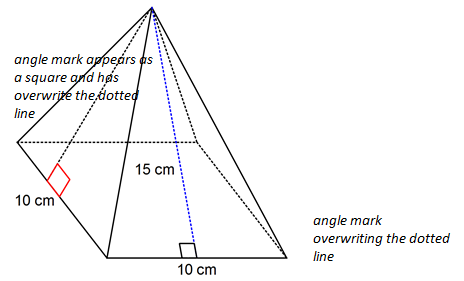
Why are these perpendicular angle marks being drawn as squares? I just want two lines.

Answer:

Although it is not obvious from your diagram, this is because you are drawing shaded angle marks and the shading has been set to white. When angle marks are shaded, they draw the complete square.

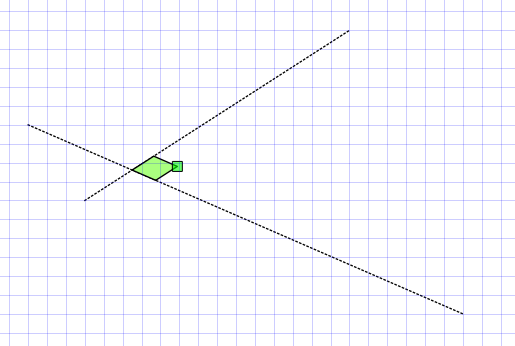
Here I have marked an angle as perpendicular and shaded it. In your case the shading is white but I have made it green so that you can see it. To get a normal perpendicular mark, select the angle mark (as shown above) and change the shading to none.

When there is no shading attached to the angle mark, FX draw will only draw the two lines rather than the square.

Posted in Draw | Tagged , | Leave a comment

Marking Angles

Question:

The angle marking tool is not allowing me to mark the angle I want. How can I fix this?

Answer:

I think your question is relating to this situation – where you are trying to mark angle ABC but the angle marking tool is always finding ABD or DBC.

Continue reading

Posted in Draw | Tagged , | Leave a comment

How Do I Shade an Integral to the y Axis?

Question:

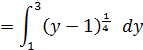
How do I shade the area

what formula should I put in? I have (y=x4+1, y=1, y=3)

Continue reading

Posted in Draw, Graph | Tagged , | Leave a comment