Changes to Word Integration

 
Recent changes in security for all recent versions of Windows, has forced a change in the way we integrate our products into Word.

Previously, you were offered a chance to integrate with Word as part of installation. You could also choose to integrate for All Users. The security changes have prevented us from offering the option to integrate for All Users in a reliable way (installing for just the current user is not usually useful in school situations) so we have been forced to change our systems.

Now each user integrates with Word individually. This is not as hard as it sounds.

hfchjaie

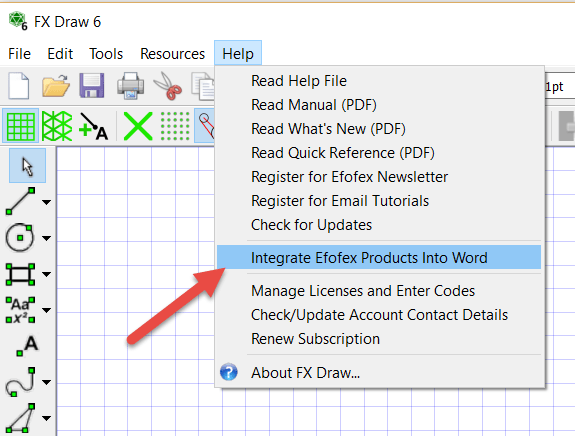
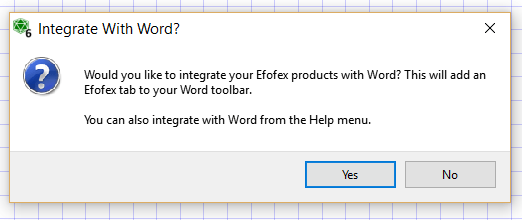
Pressing Yes at this point is all that is required for a User to perform the integration.

If the user happens to choose No, they can always integrate later from the Help menu.

bbjiacdg

This can be done at any time and the new Word tab will show up the next time Word is started.

The good news is that this new process is far more resilient and can be actioned by the user. There is less likelihood that technical support will need to be involved.

Posted in Uncategorized | Tagged | Leave a comment

New Histogram Graphing Option

This feature has been inspired by numerous user requests.

We are not entirely sure what name to give this new feature so we have called it “Use Alternative Axes”

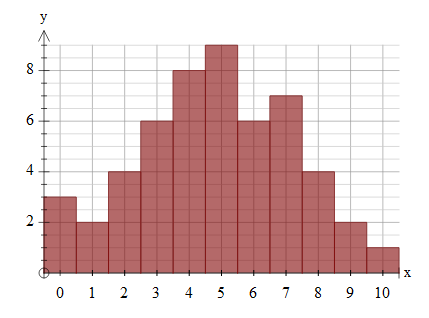
First some context. There is a need in some school systems for a graph that is a Histogram but that doesn’t just have a scale on the x axis. This is particularly the case when the graphed data is integer amounts.

For example, for this data table…

x 0 1 2 3 4 5 6 7 8 9 10
f 3 2 5 6 8 9 6 7 4 2 1

Some users wanted to produce this

aaegdajg

but FX Draw and FX Stat would only produce this
feaefiab
We have now added the ability to use the alternative axes style.
snaghtml24a3fe61
If you are graphing grouped data such as this data that is grouped into 0-5, 5-10 and so on, the alternative axes will mark the centre of the division – another commonly requested feature.

bdacdbef


Posted in Uncategorized | Tagged , | Leave a comment

Pick Your Own Subscription Length And More Email Addresses


We have made renewing your subscription more flexible. Now, when ordering or renewing a subscription, you can choose a subscription length from 12 months to 36 months. This allows you to align your resubscription date with your school calendar.

You also now have the ability to attach four email addresses to a subscription.

1. Main Email Address
2. Technical Support Email Address
3. Accounts Email Address
4. Other Email Address

We will send appropriate emails to each address. This should make life easier for busy teachers as WE will remember to send emails to the right places!

Posted in Uncategorized | Tagged , | Leave a comment

The Two Piece Puzzle – A New Teacher Resource Project Upload


We have uploaded a new Teacher Resource Project file – The Two Piece Puzzle

This activity provides the nets for a two piece 3D jigsaw puzzle. The two pieces fit together to form a tetrahedron but a surprising number of people find the puzzle quite difficult to do (it is obviously not too hard, there ARE only two pieces!)

Posted in Uncategorized | Tagged , | Leave a comment

New Feature – Adjust Line Length and Angle After Creation


This is another Efofex Teacher Resource Project inspired feature.

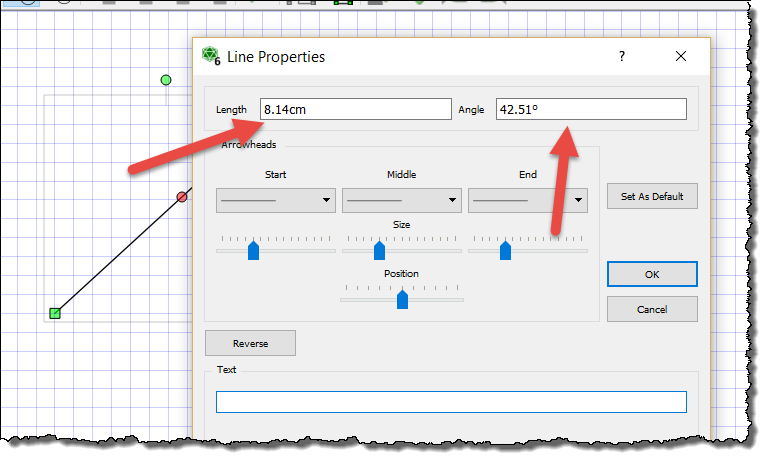
We have added a feature to FX Draw that allows you to adjust a line’s length and angle after creation. You have always been able to adjust a line visually but now you can explicitly set a line’s length and angle.

1. Draw a line using any of the line tools.
2. Right click on the line.

3. Adjust the length and/or angle.
4. Press OK.

Posted in Uncategorized | Tagged , | Leave a comment

Quad Quandary – A New Teacher Resource Project Upload


We have uploaded a new Teacher Resource Project file – Quad Quandary.

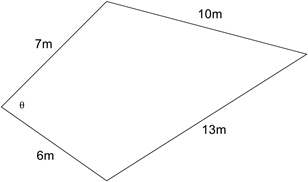
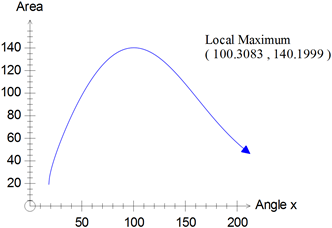
Quad Quandary looks at optimising the area of a quadrilateral by changing the angle between two of the sides.

This requires the optimisation of this function.

The students are provided with some guidance in developing the formula for the situation but require knowledge of the cosine rule, the sine formula for area of a triangle and knowledge of inverse trigonometric functions. They will also require use of a graphics calculator or graphing program such as FX Graph in order to optimise the function.

The activity is designed to be done as a pre-test activity and then an in-class validation test but can be adapted to suit your needs.

Posted in Uncategorized | Tagged , | Leave a comment

New Feature: Select Number of Decimal Places in Data Generators


This feature was suggest to us at a recent mathematics conference. If you have a good idea for how we can improve our products, you can always send it to us at info@efofex.com.

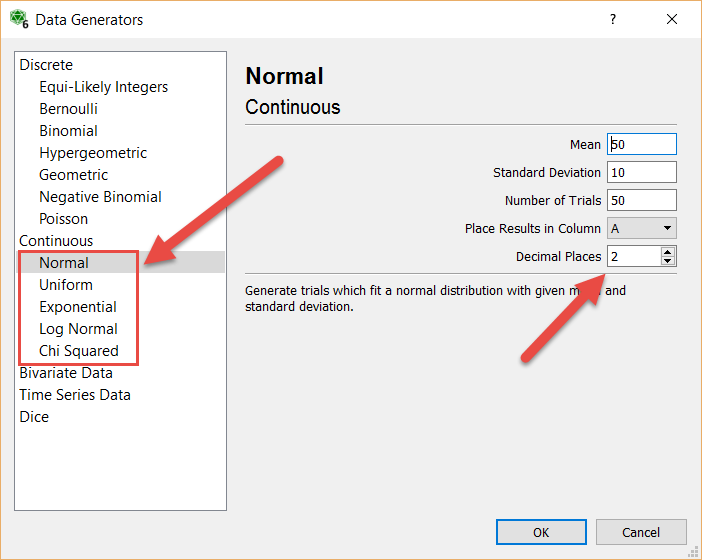
We have added the ability to select the number of decimal places generated with our continuous data generators.

If you are not using the data generators in FX Stat and the statistics tool of FX Draw, you really should be. They give you quick and simple access to a large number of distributions.

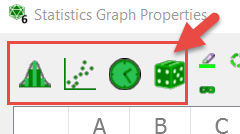
These four buttons give you access to the selection of generators.

There are fifteen generators in all including a very handy bivariate data generator that allows you to enter the regression formula you would like to fit and a target correlation coefficient. Once you have selected your parameters, the generator generates random values from the selected distribution.

A new decimal places option has been added to the continuous distributions. You can select anywhere from 8 down to -2 decimal places (-2 rounds to the nearest 100).

Posted in Uncategorized | Tagged , | Leave a comment

New Standard Line Types


Another Efofex Teacher Resource Project inspired feature.

FX Draw has always been able to draw things like network diagrams by appropriately setting up the “default” line type but the process was a bit fiddly and many of our users never realised that it was possible. Now we have added a number of pre-set standard lines that make this quicker and easier.

ddfcdhja

Go to the Line tools and select Choose a Standard Default Line Type. We will choose a network line that has an open circle at each end. This will set up the default line type and turn Use Defaults on. Now, all of the line tools will use this default, making drawing network diagrams trivial.

jhhbechh

Posted in Uncategorized | Tagged , | Leave a comment

New FX Equation Feature

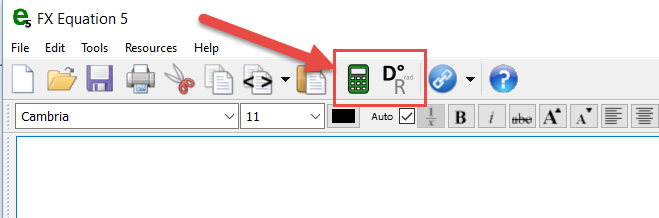
The Efofex Teacher Resource Project has inspired a number of new features for our products. In FX Equation, we have added a new calculator button.

As we were typing solutions to problems we realised that we were repeatedly reaching for a scientific calculator to calculate simple expressions and were often just retyping what was displayed on the FX Equation screen.

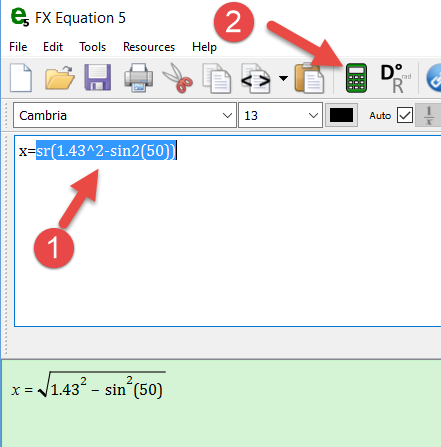
The new calculator button removes the need for the scientific calculator. Simply select the expression that you want to simplify and then press the calculator button.

If the currently selected expression is calculable, FX Equation will simplify the expression and place the value onto the clipboard. I can then type the next line, pasting in the calculated value.

The new calculator feature is just the beginning of our plans for new, time-saving features that will be added to FX Equation! The new feature is included in the latest release (5.008.1)

Posted in Uncategorized | Tagged , | Leave a comment

Major New Project From Efofex!


We usually spend the Christmas break hunkered down, using the quiet time to do something a bit different. This time we have come up with something very special and are proud to announce the

Efofex Teacher Resource Project

The Teacher Resource Project is simple in concept but provides a lot of value for both you and us. We are producing publication quality materials that you can use in your teaching but also showcase the things that our products, particularly FX Draw, can do. Everyone has access to the files in a non-editable PDF format. Registered users have access to the materials in editable Microsoft Word (docx) format that also includes fully worked solutions. (Note that you must be using the latest versions of our mathematics products to access the docx versions).

To give you an idea of what you can expect, here’s the beginning of an investigative task on the Spiral of Theodorus
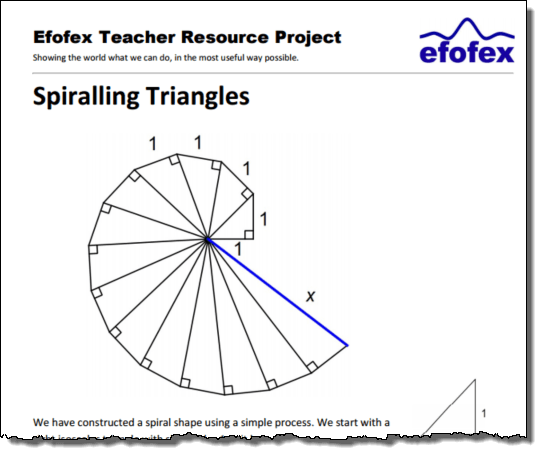
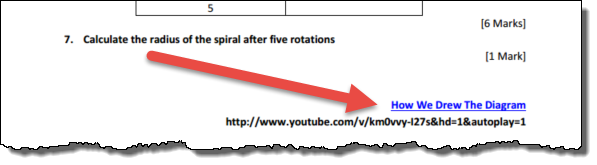
Perhaps the most exciting aspect of the Resource Project is that each document includes links to small videos that show you how we drew the diagrams. This means that you get the materials AND the knowledge on how to modify them or produce your own similar materials at the same time!

The Teacher Resource Project is an evolving thing. We will listen to what you want and try to produce materials that are relevant to your needs. At the moment there are six documents. We will be adding to this list regularly.

You can take a look at the Project web page straight away at http://efofex.com/etrp.php.

So what can you do with these materials?

If you are a teacher, just about anything you like.

You can copy them, modify them, put them into your school assessments. Whatever. The only thing we do not allow is for you to claim copyright over them or use them to make a profit. We have put together a full FAQ at http://efofex.com/acceptableuse.php.

A Hidden Benefit

There is also a hidden benefit of the Teacher Resource Project. As we use the products to produce the diagrams, we have found lots of little issues and annoyances, as well as having a number of really good ideas about improvements. In other words, the whole process has a positive impact on the quality of the products. We will be announcing lots of new features over the next few days that are the direct result of the Teacher Resource Project.

We are very excited about the Teacher Resource Project and look forward to providing you with great materials and training as it develops!

Posted in Uncategorized | Tagged , | Leave a comment